# Plugin Configuration
As plugin functionality grows, you may need to define configurations to allow users to customize plugin behavior.
AstrBot provides "powerful" configuration parsing and visualization features. Users can configure plugins directly in the management panel without modifying code.
## Configuration Definition
To register configurations, first add a `_conf_schema.json` JSON file in your plugin directory.
The file content is a `Schema` that represents the configuration. The Schema is in JSON format, for example:
```json
{
"token": {
"description": "Bot Token",
"type": "string"
},
"sub_config": {
"description": "Test nested configuration",
"type": "object",
"hint": "xxxx",
"items": {
"name": {
"description": "testsub",
"type": "string",
"hint": "xxxx"
},
"id": {
"description": "testsub",
"type": "int",
"hint": "xxxx"
},
"time": {
"description": "testsub",
"type": "int",
"hint": "xxxx",
"default": 123
}
}
}
}
```
- `type`: **Required**. The type of the configuration. Supports `string`, `text`, `int`, `float`, `bool`, `object`, `list`, `dict`, `template_list`, `file`. When the type is `text`, it will be visualized as a larger resizable textarea component to accommodate large text.
- `description`: Optional. Description of the configuration. A one-sentence description of the configuration's behavior is recommended.
- `hint`: Optional. Hint information for the configuration, displayed in the question mark button on the right in the image above, shown when hovering over it.
- `obvious_hint`: Optional. Whether the configuration hint should be prominently displayed, like `token` in the image above.
- `default`: Optional. The default value of the configuration. If the user hasn't configured it, the default value will be used. Default values: int is 0, float is 0.0, bool is False, string is "", object is {}, list is [].
- `items`: Optional. If the configuration type is `object`, the `items` field needs to be added. The content of `items` is the sub-Schema of this configuration item. Theoretically, it can be nested infinitely, but excessive nesting is not recommended.
- `invisible`: Optional. Whether the configuration is hidden. Default is `false`. If set to `true`, it will not be displayed in the management panel.
- `options`: Optional. A list, such as `"options": ["chat", "agent", "workflow"]`. Provides dropdown list options.
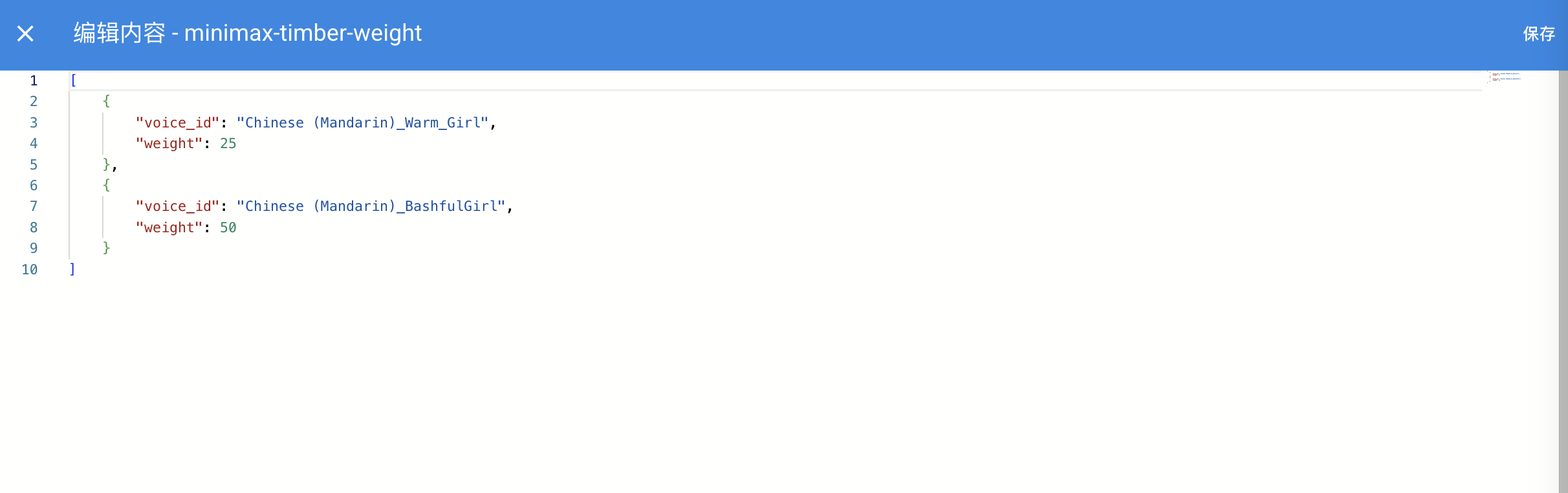
- `editor_mode`: Optional. Whether to enable code editor mode. Requires AstrBot >= `v3.5.10`. Versions below this won't report errors but won't take effect. Default is false.
- `editor_language`: Optional. The code language for the code editor, defaults to `json`.
- `editor_theme`: Optional. The theme for the code editor. Options are `vs-light` (default) and `vs-dark`.
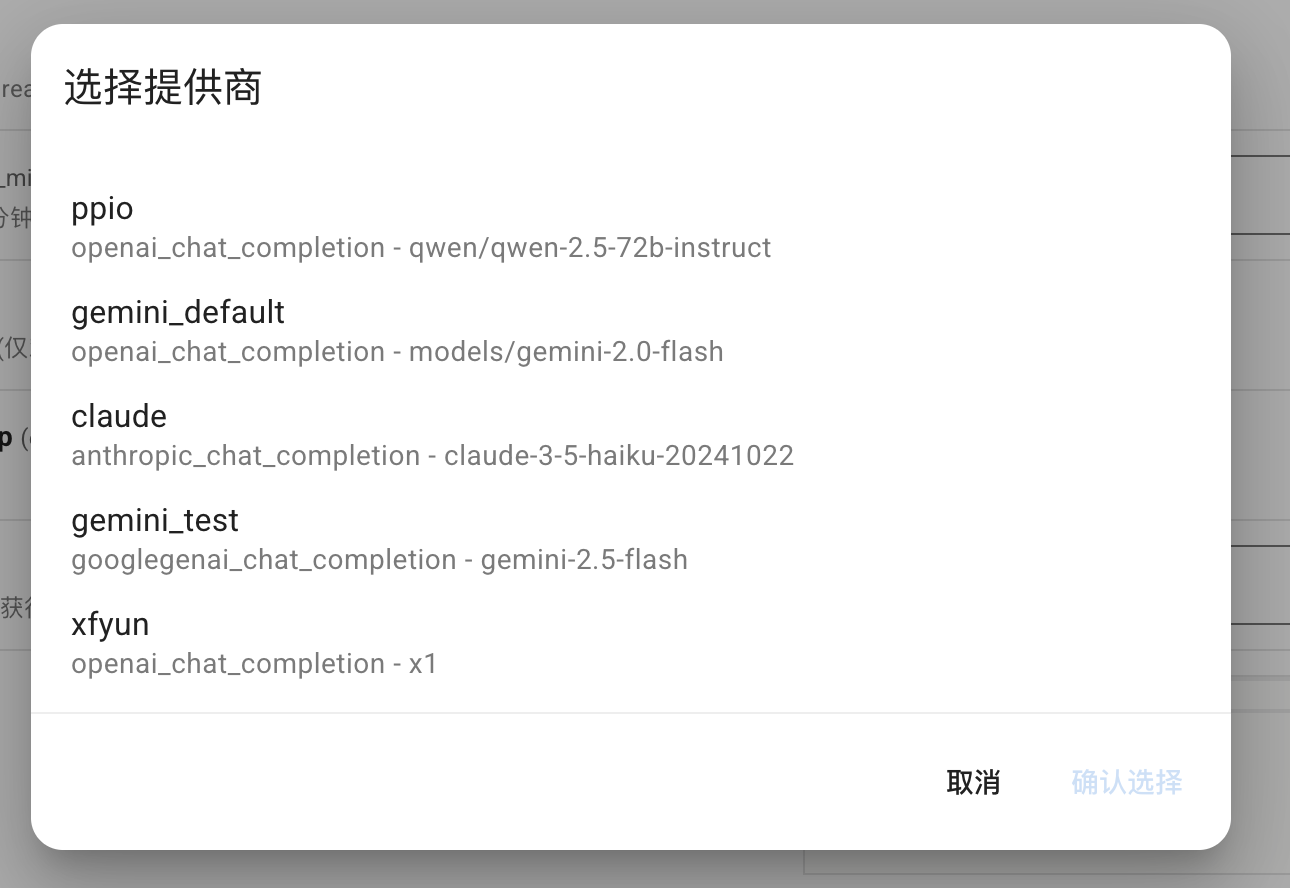
- `_special`: Optional. Used to call AstrBot's visualization features for provider selection, persona selection, knowledge base selection, etc. See details below.
### Configuration Internationalization (Optional)
Configuration `description`, `hint`, and select `labels` can follow the WebUI language. See [Plugin Internationalization](./plugin-i18n).
When the code editor is enabled, it looks like this:

The **_special** field is only available after v4.0.0. Common values include `select_provider`, `select_provider_tts`, `select_provider_stt`, `select_persona`, and `select_knowledgebase`, allowing users to quickly select model providers, personas, knowledge bases, and other data already configured in the WebUI.
- `select_provider`, `select_provider_tts`, `select_provider_stt`, and `select_persona` return strings.
- `select_knowledgebase` returns a `list` and supports multiple selection, so the corresponding config item should use `type: list` with a default value of `[]`.
> [!NOTE]
> For reference, AstrBot Core also uses other internal `_special` values, such as `select_providers`, `provider_pool`, `persona_pool`, `select_plugin_set`, `t2i_template`, `get_embedding_dim`, and `select_agent_runner_provider:*` (where `*` is a placeholder for the runner type). These are internal implementations and may change at any time — please avoid using them in plugins.
Using `select_provider` as an example, it will display as follows:
### `file` type schema
Introduced in v4.13.0, this allows plugins to define file-upload configuration items to guide users to upload files required by the plugin.
```json
{
"demo_files": {
"type": "file",
"description": "Uploaded files for demo",
"default": [],
"file_types": ["pdf", "docx"]
}
}
```
### `dict` type schema
Used to visualize editing a Python `dict` type configuration. For example, AstrBot Core's custom extra body parameter configuration:
```py
"custom_extra_body": {
"description": "Custom request body parameters",
"type": "dict",
"items": {},
"hint": "Used to add extra parameters to requests, such as temperature, top_p, max_tokens, etc.",
"template_schema": {
"temperature": {
"name": "Temperature",
"description": "Temperature parameter",
"hint": "Controls randomness of output, typically 0-2. Higher is more random.",
"type": "float",
"default": 0.6,
"slider": {"min": 0, "max": 2, "step": 0.1},
},
"top_p": {
"name": "Top-p",
"description": "Top-p sampling",
"hint": "Nucleus sampling parameter, typically 0-1. Controls probability mass considered.",
"type": "float",
"default": 1.0,
"slider": {"min": 0, "max": 1, "step": 0.01},
},
"max_tokens": {
"name": "Max Tokens",
"description": "Maximum tokens",
"hint": "Maximum number of tokens to generate.",
"type": "int",
"default": 8192,
},
},
}
```
### `template_list` type schema
> [!NOTE]
> Introduced in v4.10.4. For more details see: [#4208](https://github.com/AstrBotDevs/AstrBot/pull/4208)
Plugin developers can add a template-style configuration to `_conf_schema` in the following format (somewhat similar to nested configs):
```json
"field_id": {
"type": "template_list",
"description": "Template List Field",
"templates": {
"template_1": {
"name": "Template One",
"hint":"hint",
"display_item": "attr_name",
"hide_hint_in_list": true,
"items": {
"attr_name": {
"description": "Attribute Name",
"type": "string",
"default": ""
},
"attr_a": {
"description": "Attribute A",
"type": "int",
"default": 10
},
"attr_b": {
"description": "Attribute B",
"hint": "This is a boolean attribute",
"type": "bool",
"default": true
}
}
},
"template_2": {
"name": "Template Two",
"hint":"hint",
"items": {
"attr_c": {
"description": "Attribute A",
"type": "int",
"default": 10
},
"attr_d": {
"description": "Attribute B",
"hint": "This is a boolean attribute",
"type": "bool",
"default": true
}
}
}
}
}
```
Saved config example:
```json
"field_id": [
{
"__template_key": "template_1",
"attr_name": "",
"attr_a": 10,
"attr_b": true
},
{
"__template_key": "template_2",
"attr_c": 10,
"attr_d": true
}
]
```
Templates also support these optional fields:
- `display_item`: Specifies the key of a `string` item inside the template `items`. When set, the WebUI shows that field's current value in the collapsed list of added template entries, for example `Attribute Name: my-adapter`, making it easier to distinguish multiple entries created from the same template. Dot paths are supported for fields inside nested objects, for example `meta.name`.
- `hide_hint_in_list`: When set to `true`, the WebUI hides the template `hint` in the collapsed list of added template entries. The template selection dropdown still shows the `hint`, and hints for fields inside the expanded entry are not affected.
 ## Using Configuration in Plugins
When loading plugins, AstrBot will check if there's a `_conf_schema.json` file in the plugin directory. If it exists, it will automatically parse the configuration and save it under `data/config/_config.json` (a configuration file entity created according to the Schema), and pass it to `__init__()` when instantiating the plugin class.
```py
from astrbot.api import AstrBotConfig
class ConfigPlugin(Star):
def __init__(self, context: Context, config: AstrBotConfig): # AstrBotConfig inherits from Dict and has all dictionary methods
super().__init__(context)
self.config = config
print(self.config)
# Supports direct configuration saving
# self.config.save_config() # Save configuration
```
## Configuration Updates
When you update the Schema across different versions, AstrBot will recursively inspect the configuration items in the Schema, automatically adding default values for missing items and removing those that no longer exist.
## Using Configuration in Plugins
When loading plugins, AstrBot will check if there's a `_conf_schema.json` file in the plugin directory. If it exists, it will automatically parse the configuration and save it under `data/config/_config.json` (a configuration file entity created according to the Schema), and pass it to `__init__()` when instantiating the plugin class.
```py
from astrbot.api import AstrBotConfig
class ConfigPlugin(Star):
def __init__(self, context: Context, config: AstrBotConfig): # AstrBotConfig inherits from Dict and has all dictionary methods
super().__init__(context)
self.config = config
print(self.config)
# Supports direct configuration saving
# self.config.save_config() # Save configuration
```
## Configuration Updates
When you update the Schema across different versions, AstrBot will recursively inspect the configuration items in the Schema, automatically adding default values for missing items and removing those that no longer exist.