 0a0c677404
* docs(community): 更新 QQ 群组信息
- 移除了旧的 QQ 群组信息并添加了新的群组。
- 确保所有群组信息的准确性和完整性。
- 提升文档的可读性和用户体验。

* docs(webui): 为忘记密码章节添加 FAQ 引用链接

- 在英文和中文文档的"忘记密码"章节末尾添加 TIP 提示框
- 提示框链接至对应 FAQ 条目,提供更详细的操作说明
- 增强文档之间的关联性,提升用户查阅体验

* docs(command): 新增 /stats 和 /provider 指令文档,更新 FAQ 管理员指令列表

- 在英文和中文的命令文档中添加 /stats 和 /provider 指令的详细使用说明
- 更新中英文 FAQ 页面的管理员指令列表,与最新的默认指令保持一致
- 确保中英文文档内容同步,提升文档准确性和用户查阅体验

* docs(websearch): 新增 Firecrawl 网页搜索提供商文档支持

- 在开发版配置文档中补充 websearch_provider 选项,加入 firecrawl 及对应密钥配置项
- 更新中英文网页搜索使用指南,将支持搜索源数量同步为五种并提供 Firecrawl 注册指引
- 确保中英文文档内容一致,提升配置说明的完整性和用户查阅体验

* docs(plugin-publish): 更新插件提交方式至新仓库

- 废弃通过 AstrBot 主仓库 Issue 提交插件的方式
- 新增警告框提示正确提交入口为 AstrBot_Plugins_Collection
- 同步更新中英文版插件发布文档
2.3 KiB
Publishing Plugins to the Plugin Marketplace
After completing your plugin development, you can choose to publish it to the AstrBot Plugin Marketplace, allowing more users to benefit from your work.
AstrBot uses GitHub to host plugins, so you'll need to push your plugin code to the GitHub plugin repository you created earlier.
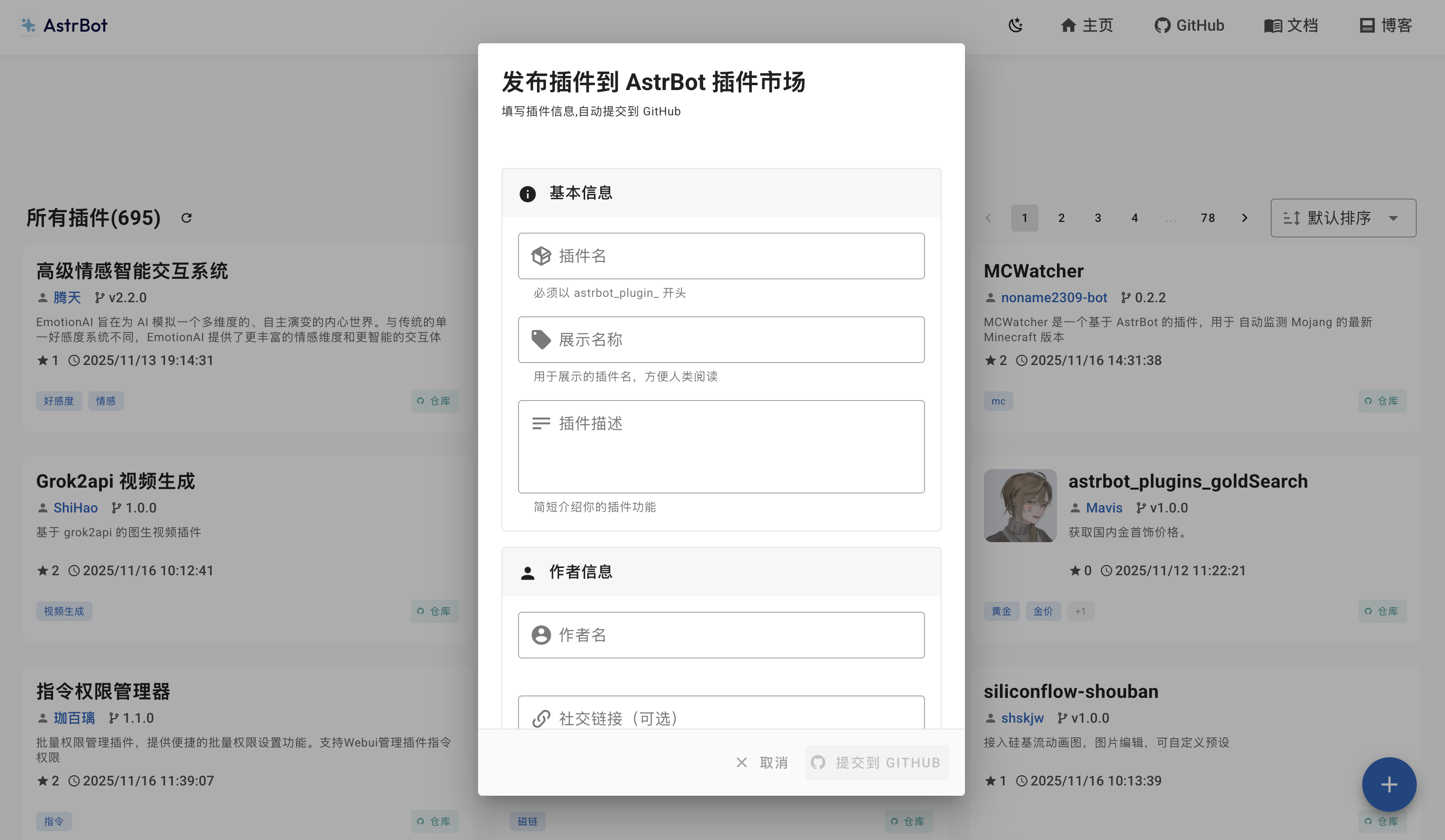
You can submit your plugin by visiting the AstrBot Plugin Marketplace. Once on the website, click the + button in the bottom-right corner, fill in the basic information, author details, repository information, and other required fields. Then click the Submit to GITHUB button.
Warning
Main repository Issue submission is deprecated: The previous method of submitting plugins via Issues in the AstrBot main repository is no longer used. Please submit your plugin at the AstrBot_Plugins_Collection repository.
You will be redirected to the AstrBot_Plugins_Collection repository's Issue submission page. Please verify that all information is correct, then click the Create button to complete the plugin publication process.
⚠️ Size Limit: The plugin zip package submitted to the marketplace must not exceed 16MB. If it exceeds this limit, the CI/CD pipeline will automatically reject the submission.
To ensure your plugin passes review and publication smoothly, we recommend the following:
- Compress static assets: Compress images, audio, and other resource files in your plugin to reduce their size.
- Clean up unnecessary files: Avoid including directories like
.git,__pycache__,node_modules, or development configuration files in your plugin repository. Add a.gitignorefile to your repository root to exclude them.- Optimize dependency size: If your plugin depends on large libraries, consider trimming them down or importing only what is needed.
- Use
.gitattributesor a release branch: Reduce the zip package size by including only the files necessary for distribution.If your plugin truly cannot be compressed to under 16MB due to business requirements, please contact the maintainer to manually bypass this limit.