mirror of
https://github.com/AstrBotDevs/AstrBot
synced 2026-07-17 09:50:31 +08:00
 fd4fe84310
* Update listen-message-event.md

* Update other.md

* Update send-message.md

* Update ai.md

* Update ai.md

* Update send-message.md

* Update listen-message-event.md

* Delete docs/zh/dev/star/guides/env.md

* Delete docs/en/dev/star/guides/env.md

* Update simple.md

* Update discord.md

* Update discord.md

* Update matrix.md

* Update matrix.md

* Update index.md

* Update index.md

* Update openapi.md

* Update ppio.md

* Update ppio.md

* Update function-calling.md

* Update function-calling.md

* Update config.mjs

* docs: add EN desktop deployment page

* Update plugin.md

* Update ai.md

* Update ai.md

* Update ai.md

* Update desktop.md
131 lines
4.3 KiB
Markdown
131 lines
4.3 KiB
Markdown
# Sending Messages
|
|
|
|
## Passive Messages
|
|
|
|
Passive messages refer to the bot responding to messages reactively.
|
|
|
|
```python
|
|
@filter.command("helloworld")
|
|
async def helloworld(self, event: AstrMessageEvent):
|
|
yield event.plain_result("Hello!")
|
|
yield event.plain_result("你好!")
|
|
|
|
yield event.image_result("path/to/image.jpg") # Send an image
|
|
yield event.image_result("https://example.com/image.jpg") # Send an image from URL, must start with http or https
|
|
```
|
|
|
|
## Active Messages
|
|
|
|
Active messages refer to the bot proactively pushing messages. Some platforms may not support active message sending.
|
|
|
|
For scheduled tasks or when you don't want to send messages immediately, you can use `event.unified_msg_origin` to get a string and store it, then use `self.context.send_message(unified_msg_origin, chains)` to send messages when needed.
|
|
|
|
```python
|
|
from astrbot.api.event import MessageChain
|
|
|
|
@filter.command("helloworld")
|
|
async def helloworld(self, event: AstrMessageEvent):
|
|
umo = event.unified_msg_origin
|
|
message_chain = MessageChain().message("Hello!").file_image("path/to/image.jpg")
|
|
await self.context.send_message(event.unified_msg_origin, message_chain)
|
|
```
|
|
|
|
With this feature, you can store the `unified_msg_origin` and send messages when needed.
|
|
|
|
> [!TIP]
|
|
> About unified_msg_origin.
|
|
> `unified_msg_origin` is a string that records the unique ID of a session. AstrBot uses it to identify which messaging platform and which session it belongs to. This allows messages to be sent to the correct session when using `send_message`. For more about MessageChain, see the next section.
|
|
|
|
## Rich Media Messages
|
|
|
|
AstrBot supports sending rich media messages such as images, audio, videos, etc. Use `MessageChain` to construct messages.
|
|
|
|
```python
|
|
import astrbot.api.message_components as Comp
|
|
|
|
@filter.command("helloworld")
|
|
async def helloworld(self, event: AstrMessageEvent):
|
|
chain = [
|
|
Comp.At(qq=event.get_sender_id()), # Mention the message sender
|
|
Comp.Plain("Check out this image:"),
|
|
Comp.Image.fromURL("https://example.com/image.jpg"), # Send image from URL
|
|
Comp.Image.fromFileSystem("path/to/image.jpg"), # Send image from local file system
|
|
Comp.Plain("This is an image.")
|
|
]
|
|
yield event.chain_result(chain)
|
|
```
|
|
|
|
The above constructs a `message chain`, which will ultimately send a message containing both images and text while preserving the order.
|
|
|
|
> [!TIP]
|
|
> In the aiocqhttp message adapter, for messages of type `plain`, the `strip()` method is used during sending to remove spaces and line breaks. You can add zero-width spaces `\u200b` before and after the message to resolve this issue.
|
|
|
|
Similarly,
|
|
|
|
**File**
|
|
|
|
```py
|
|
Comp.File(file="path/to/file.txt", name="file.txt") # Not supported by some platforms
|
|
```
|
|
|
|
**Audio Record**
|
|
|
|
```py
|
|
path = "path/to/record.wav" # Currently only accepts wav format, please convert other formats yourself
|
|
Comp.Record(file=path, url=path)
|
|
```
|
|
|
|
**Video**
|
|
|
|
```py
|
|
path = "path/to/video.mp4"
|
|
Comp.Video.fromFileSystem(path=path)
|
|
Comp.Video.fromURL(url="https://example.com/video.mp4")
|
|
```
|
|
|
|
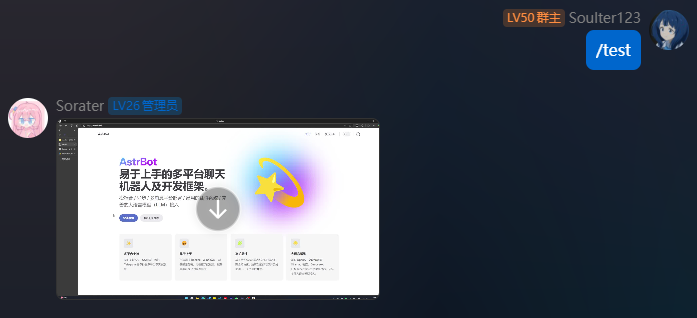
## Sending Video Messages
|
|
|
|
```python
|
|
from astrbot.api.event import filter, AstrMessageEvent
|
|
|
|
@filter.command("test")
|
|
async def test(self, event: AstrMessageEvent):
|
|
from astrbot.api.message_components import Video
|
|
# fromFileSystem requires the user's protocol client and bot to be on the same system.
|
|
video = Video.fromFileSystem(
|
|
path="test.mp4"
|
|
)
|
|
# More universal approach
|
|
video = Video.fromURL(
|
|
url="https://example.com/video.mp4"
|
|
)
|
|
yield event.chain_result([video])
|
|
```
|
|
|
|
|
|
|
|
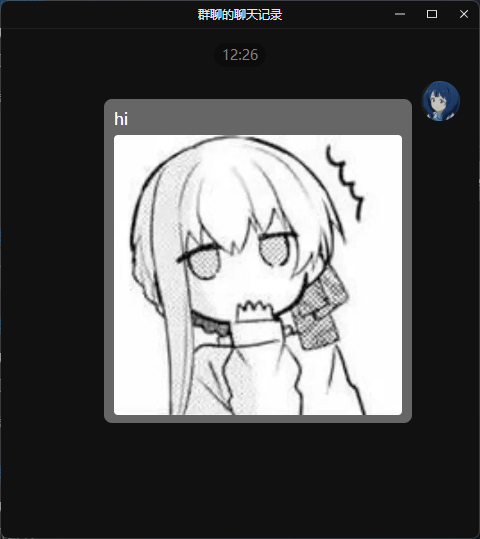
## Sending Group Forward Messages
|
|
|
|
> Most platforms do not support this message type. Current support: OneBot v11
|
|
|
|
You can send group forward messages as follows.
|
|
|
|
```py
|
|
from astrbot.api.event import filter, AstrMessageEvent
|
|
|
|
@filter.command("test")
|
|
async def test(self, event: AstrMessageEvent):
|
|
from astrbot.api.message_components import Node, Plain, Image
|
|
node = Node(
|
|
uin=905617992,
|
|
name="Soulter",
|
|
content=[
|
|
Plain("hi"),
|
|
Image.fromFileSystem("test.jpg")
|
|
]
|
|
)
|
|
yield event.chain_result([node])
|
|
```
|
|
|
|
|