mirror of
https://github.com/AstrBotDevs/AstrBot
synced 2026-07-17 09:50:31 +08:00
 fd4fe84310
* Update listen-message-event.md

* Update other.md

* Update send-message.md

* Update ai.md

* Update ai.md

* Update send-message.md

* Update listen-message-event.md

* Delete docs/zh/dev/star/guides/env.md

* Delete docs/en/dev/star/guides/env.md

* Update simple.md

* Update discord.md

* Update discord.md

* Update matrix.md

* Update matrix.md

* Update index.md

* Update index.md

* Update openapi.md

* Update ppio.md

* Update ppio.md

* Update function-calling.md

* Update function-calling.md

* Update config.mjs

* docs: add EN desktop deployment page

* Update plugin.md

* Update ai.md

* Update ai.md

* Update ai.md

* Update desktop.md
131 lines
4.2 KiB
Markdown
131 lines
4.2 KiB
Markdown
# 消息的发送
|
||
|
||
## 被动消息
|
||
|
||
被动消息指的是机器人被动回复消息。
|
||
|
||
```python
|
||
@filter.command("helloworld")
|
||
async def helloworld(self, event: AstrMessageEvent):
|
||
yield event.plain_result("Hello!")
|
||
yield event.plain_result("你好!")
|
||
|
||
yield event.image_result("path/to/image.jpg") # 发送图片
|
||
yield event.image_result("https://example.com/image.jpg") # 发送 URL 图片,务必以 http 或 https 开头
|
||
```
|
||
|
||
## 主动消息
|
||
|
||
主动消息指的是机器人主动推送消息。某些平台可能不支持主动消息发送。
|
||
|
||
如果是一些定时任务或者不想立即发送消息,可以使用 `event.unified_msg_origin` 得到一个字符串并将其存储,然后在想发送消息的时候使用 `self.context.send_message(unified_msg_origin, chains)` 来发送消息。
|
||
|
||
```python
|
||
from astrbot.api.event import MessageChain
|
||
|
||
@filter.command("helloworld")
|
||
async def helloworld(self, event: AstrMessageEvent):
|
||
umo = event.unified_msg_origin
|
||
message_chain = MessageChain().message("Hello!").file_image("path/to/image.jpg")
|
||
await self.context.send_message(event.unified_msg_origin, message_chain)
|
||
```
|
||
|
||
通过这个特性,你可以将 unified_msg_origin 存储起来,然后在需要的时候发送消息。
|
||
|
||
> [!TIP]
|
||
> 关于 unified_msg_origin。
|
||
> unified_msg_origin 是一个字符串,记录了一个会话的唯一 ID,AstrBot 能够据此找到属于哪个消息平台的哪个会话。这样就能够实现在 `send_message` 的时候,发送消息到正确的会话。有关 MessageChain,请参见接下来的一节。
|
||
|
||
## 富媒体消息
|
||
|
||
AstrBot 支持发送富媒体消息,比如图片、语音、视频等。使用 `MessageChain` 来构建消息。
|
||
|
||
```python
|
||
import astrbot.api.message_components as Comp
|
||
|
||
@filter.command("helloworld")
|
||
async def helloworld(self, event: AstrMessageEvent):
|
||
chain = [
|
||
Comp.At(qq=event.get_sender_id()), # At 消息发送者
|
||
Comp.Plain("来看这个图:"),
|
||
Comp.Image.fromURL("https://example.com/image.jpg"), # 从 URL 发送图片
|
||
Comp.Image.fromFileSystem("path/to/image.jpg"), # 从本地文件目录发送图片
|
||
Comp.Plain("这是一个图片。")
|
||
]
|
||
yield event.chain_result(chain)
|
||
```
|
||
|
||
上面构建了一个 `message chain`,也就是消息链,最终会发送一条包含了图片和文字的消息,并且保留顺序。
|
||
|
||
> [!TIP]
|
||
> 在 aiocqhttp 消息适配器中,对于 `plain` 类型的消息,在发送中会使用 `strip()` 方法去除空格及换行符,可以在消息前后添加零宽空格 `\u200b` 以解决这个问题。
|
||
|
||
类似地,
|
||
|
||
**文件 File**
|
||
|
||
```py
|
||
Comp.File(file="path/to/file.txt", name="file.txt") # 部分平台不支持
|
||
```
|
||
|
||
**语音 Record**
|
||
|
||
```py
|
||
path = "path/to/record.wav" # 暂时只接受 wav 格式,其他格式请自行转换
|
||
Comp.Record(file=path, url=path)
|
||
```
|
||
|
||
**视频 Video**
|
||
|
||
```py
|
||
path = "path/to/video.mp4"
|
||
Comp.Video.fromFileSystem(path=path)
|
||
Comp.Video.fromURL(url="https://example.com/video.mp4")
|
||
```
|
||
|
||
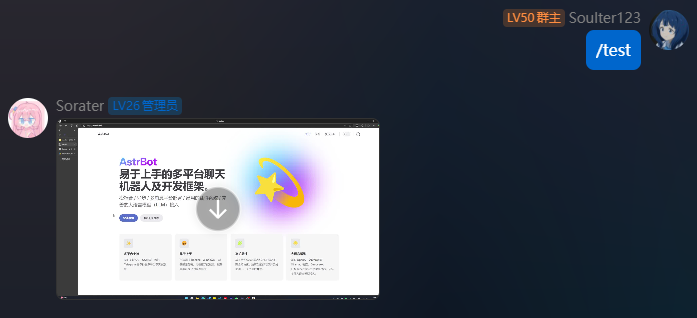
## 发送视频消息
|
||
|
||
```python
|
||
from astrbot.api.event import filter, AstrMessageEvent
|
||
|
||
@filter.command("test")
|
||
async def test(self, event: AstrMessageEvent):
|
||
from astrbot.api.message_components import Video
|
||
# fromFileSystem 需要用户的协议端和机器人端处于一个系统中。
|
||
video = Video.fromFileSystem(
|
||
path="test.mp4"
|
||
)
|
||
# 更通用
|
||
video = Video.fromURL(
|
||
url="https://example.com/video.mp4"
|
||
)
|
||
yield event.chain_result([video])
|
||
```
|
||
|
||
|
||
|
||
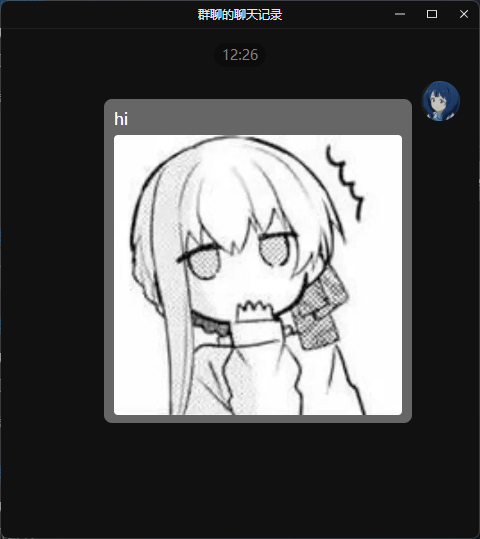
## 发送群合并转发消息
|
||
|
||
> 大多数平台都不支持此种消息类型,当前适配情况:OneBot v11
|
||
|
||
可以按照如下方式发送群合并转发消息。
|
||
|
||
```py
|
||
from astrbot.api.event import filter, AstrMessageEvent
|
||
|
||
@filter.command("test")
|
||
async def test(self, event: AstrMessageEvent):
|
||
from astrbot.api.message_components import Node, Plain, Image
|
||
node = Node(
|
||
uin=905617992,
|
||
name="Soulter",
|
||
content=[
|
||
Plain("hi"),
|
||
Image.fromFileSystem("test.jpg")
|
||
]
|
||
)
|
||
yield event.chain_result([node])
|
||
```
|
||
|
||
|