mirror of
https://github.com/AstrBotDevs/AstrBot
synced 2026-07-16 01:40:15 +08:00
 fc33b3eb68
* docs: transfer AstrBotDevs/AstrBot-docs to AstrBotDevs/AstrBot
* refactor: reorder imports and improve type hints in sync_docs_to_wiki.py and upload_doc_images_to_r2.py
* feat: add GitHub Actions workflow to sync wiki with documentation

Co-authored-by: Soulter <37870767+Soulter@users.noreply.github.com>
Co-authored-by: anka-afk <110004162+anka-afk@users.noreply.github.com>
Co-authored-by: zouyonghe <62183434+zouyonghe@users.noreply.github.com>
Co-authored-by: shuiping233 <49360196+shuiping233@users.noreply.github.com>
Co-authored-by: LIghtJUNction <106986785+LIghtJUNction@users.noreply.github.com>
Co-authored-by: Sjshi763 <179909421+Sjshi763@users.noreply.github.com>
Co-authored-by: xiewoc <70128845+xiewoc@users.noreply.github.com>
Co-authored-by: QingFeng-awa <151742581+QingFeng-awa@users.noreply.github.com>
Co-authored-by: PaloMiku <96452465+PaloMiku@users.noreply.github.com>
Co-authored-by: shangxueink <138397030+shangxueink@users.noreply.github.com>
Co-authored-by: IGCrystal-A <244300990+IGCrystal-A@users.noreply.github.com>
Co-authored-by: RC-CHN <67079377+RC-CHN@users.noreply.github.com>
Co-authored-by: MC090610 <113341105+MC090610@users.noreply.github.com>
Co-authored-by: Waterwzy <196913419+Waterwzy@users.noreply.github.com>
Co-authored-by: Lanhuace-Wan <186303160+Lanhuace-Wan@users.noreply.github.com>
Co-authored-by: LiAlH4qwq <61769640+LiAlH4qwq@users.noreply.github.com>
Co-authored-by: HSOS6 <209910899+HSOS6@users.noreply.github.com>
Co-authored-by: th-dd <162813557+th-dd@users.noreply.github.com>
Co-authored-by: miaoxutao123 <81676466+miaoxutao123@users.noreply.github.com>
Co-authored-by: nuomicici <143102889+nuomicici@users.noreply.github.com>
Co-authored-by: nasyt233 <210103278+nasyt233@users.noreply.github.com>
Co-authored-by: jlugjb <7426462+jlugjb@users.noreply.github.com>
Co-authored-by: Raven95676 <176760093+Raven95676@users.noreply.github.com>
Co-authored-by: Futureppo <180109455+Futureppo@users.noreply.github.com>
Co-authored-by: MliKiowa <61873808+MliKiowa@users.noreply.github.com>
Co-authored-by: Fridemn <150212937+Fridemn@users.noreply.github.com>
Co-authored-by: BakaCookie520 <138355736+BakaCookie520@users.noreply.github.com>
Co-authored-by: YumeYuka <125112916+YumeYuka@users.noreply.github.com>
Co-authored-by: xming521 <32786500+xming521@users.noreply.github.com>
Co-authored-by: ywh555hhh <121592812+ywh555hhh@users.noreply.github.com>
Co-authored-by: stevessr <89645372+stevessr@users.noreply.github.com>
Co-authored-by: roeseth <41995115+roeseth@users.noreply.github.com>
Co-authored-by: ikun-1145141 <265925499+ikun-1145141@users.noreply.github.com>
Co-authored-by: evpeople <54983536+evpeople@users.noreply.github.com>
Co-authored-by: Yue-bin <60509781+Yue-bin@users.noreply.github.com>
Co-authored-by: W1ndys <109416673+W1ndys@users.noreply.github.com>
Co-authored-by: TheFurina <218887821+TheFurina@users.noreply.github.com>
Co-authored-by: Seayon <12275933+Seayon@users.noreply.github.com>
Co-authored-by: OnlyblackTea <38585636+OnlyblackTea@users.noreply.github.com>
Co-authored-by: ocetars <74854972+ocetars@users.noreply.github.com>
Co-authored-by: railgun19457 <117180744+railgun19457@users.noreply.github.com>
Co-authored-by: JunieXD <107397009+JunieXD@users.noreply.github.com>
Co-authored-by: advent259141 <197440256+advent259141@users.noreply.github.com>
Co-authored-by: Doge2077 <91442300+Doge2077@users.noreply.github.com>
Co-authored-by: Bocity <23430545+Bocity@users.noreply.github.com>
Co-authored-by: Aurora-xk <192227833+Aurora-xk@users.noreply.github.com>
94 lines
4.5 KiB
Markdown
94 lines
4.5 KiB
Markdown
# 接入 Slack
|
||
|
||
## 创建 AstrBot Slack 平台适配器
|
||
|
||
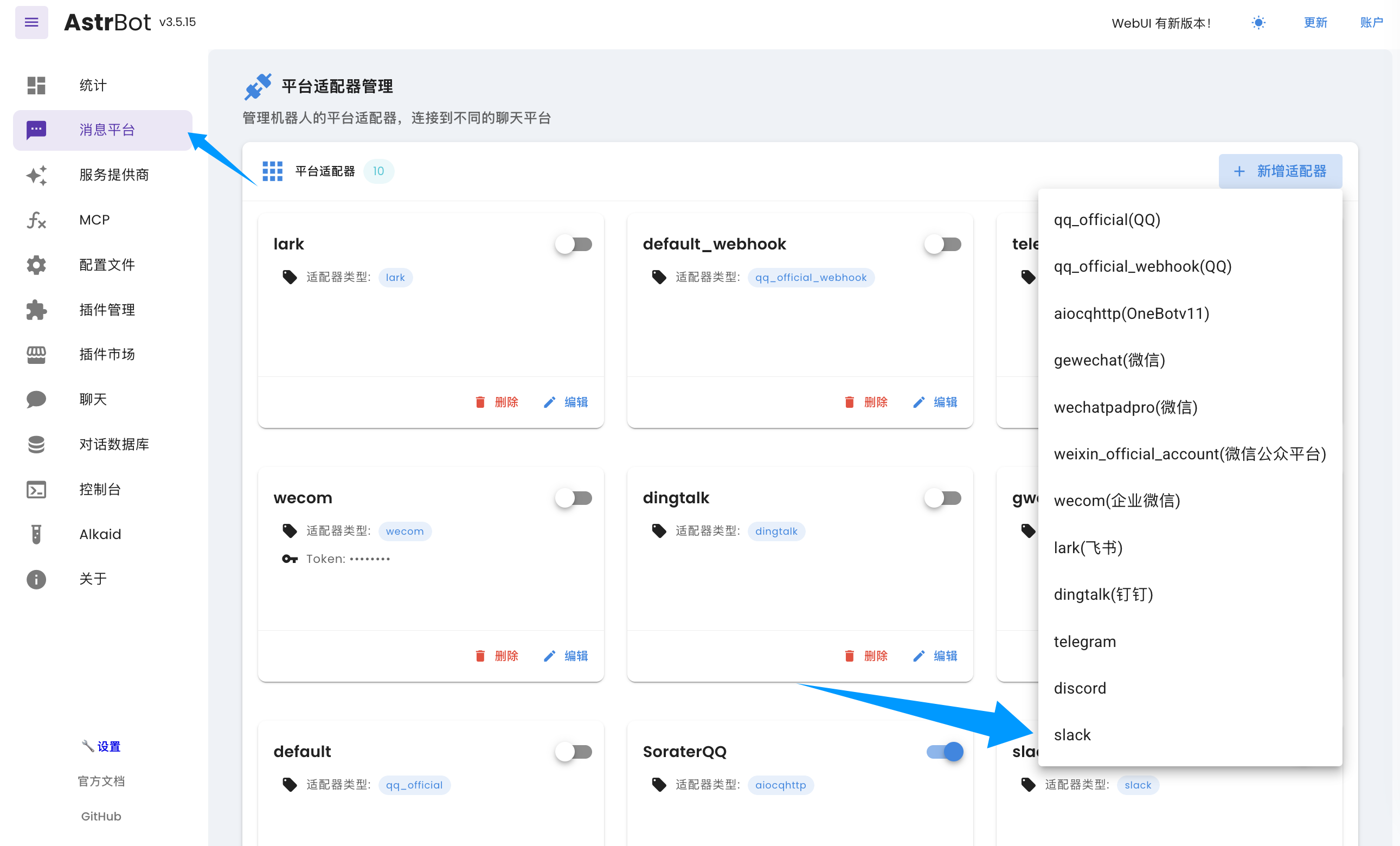
进入 `机器人` 页,点击 `+ 创建机器人`,找到 Slack 并点击进入 Slack 配置页。
|
||
|
||
|
||
|
||
在弹出的配置对话框中点击 `启用`。
|
||
|
||
## 在 Slack 创建 App
|
||
|
||
Slack 支持两种接入方式:`Webhook` 与 `Socket`。如果您没有公网服务器并且消息业务量的规模较小,我们建议您使用 `socket` 方式。如果您有公网服务器(或者有一定的技术背景,了解如何设置 Tunnel,如 Cloudflare Tunnel),可以选择 `webhook` 方式。`socket` 方式部署相对简单。
|
||
|
||
1. 创建 [Slack](https://slack.com/signin) 账号和一个工作区(Workspace)。
|
||
2. 前往 [应用后台](https://api.slack.com/apps),点击「Create New App」->「From Scratch」,输入 `应用名称` 和要添加到的工作区,然后点击「Create App」。
|
||
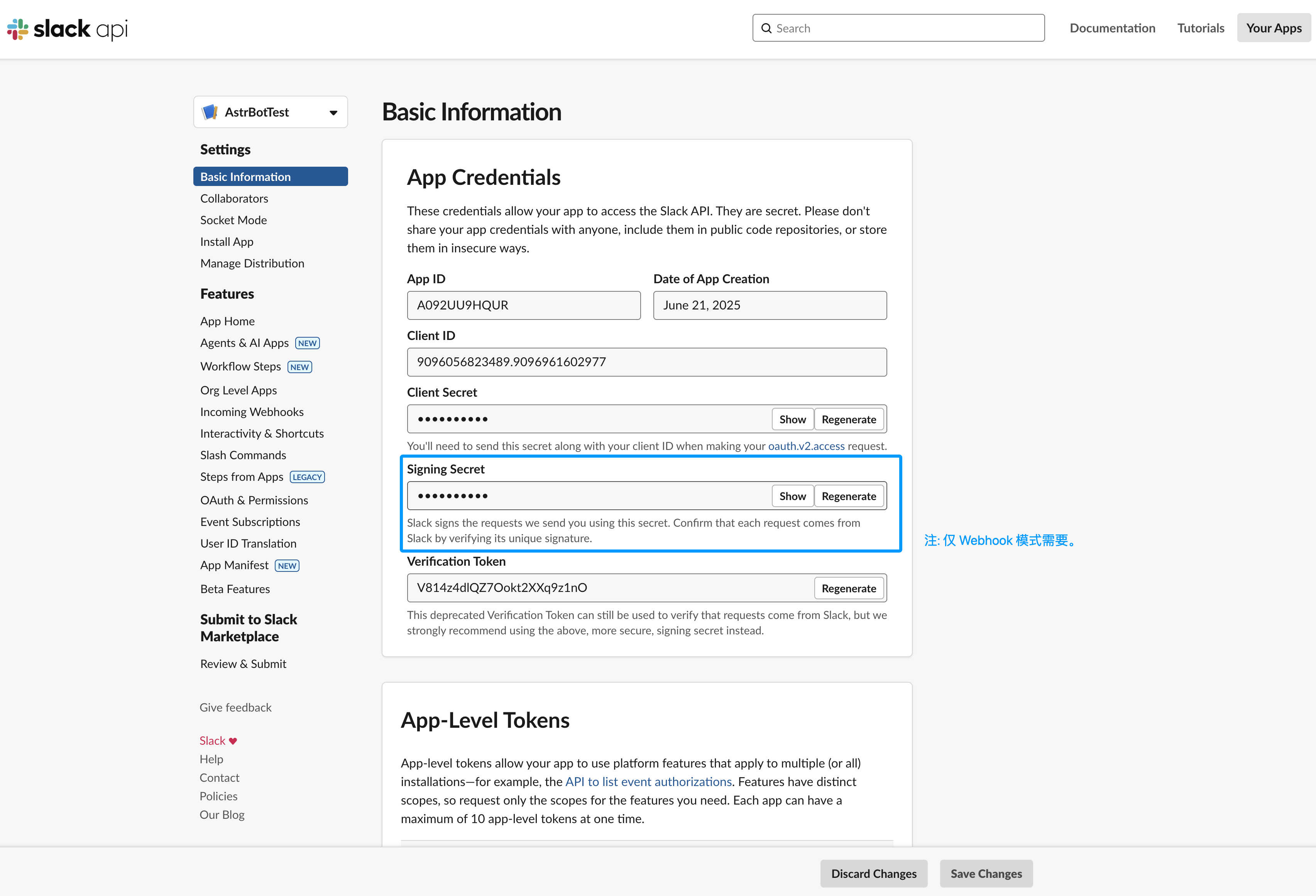
3. (仅 Webhook 需要)获取 `Signing Secret`,在左边栏 Basic Information 页下,找到 App Credentials 的 `Signing Secret`,点击 Show 并且复制到平台适配器配置的 signing_secret 处。
|
||
|
||
|
||
|
||
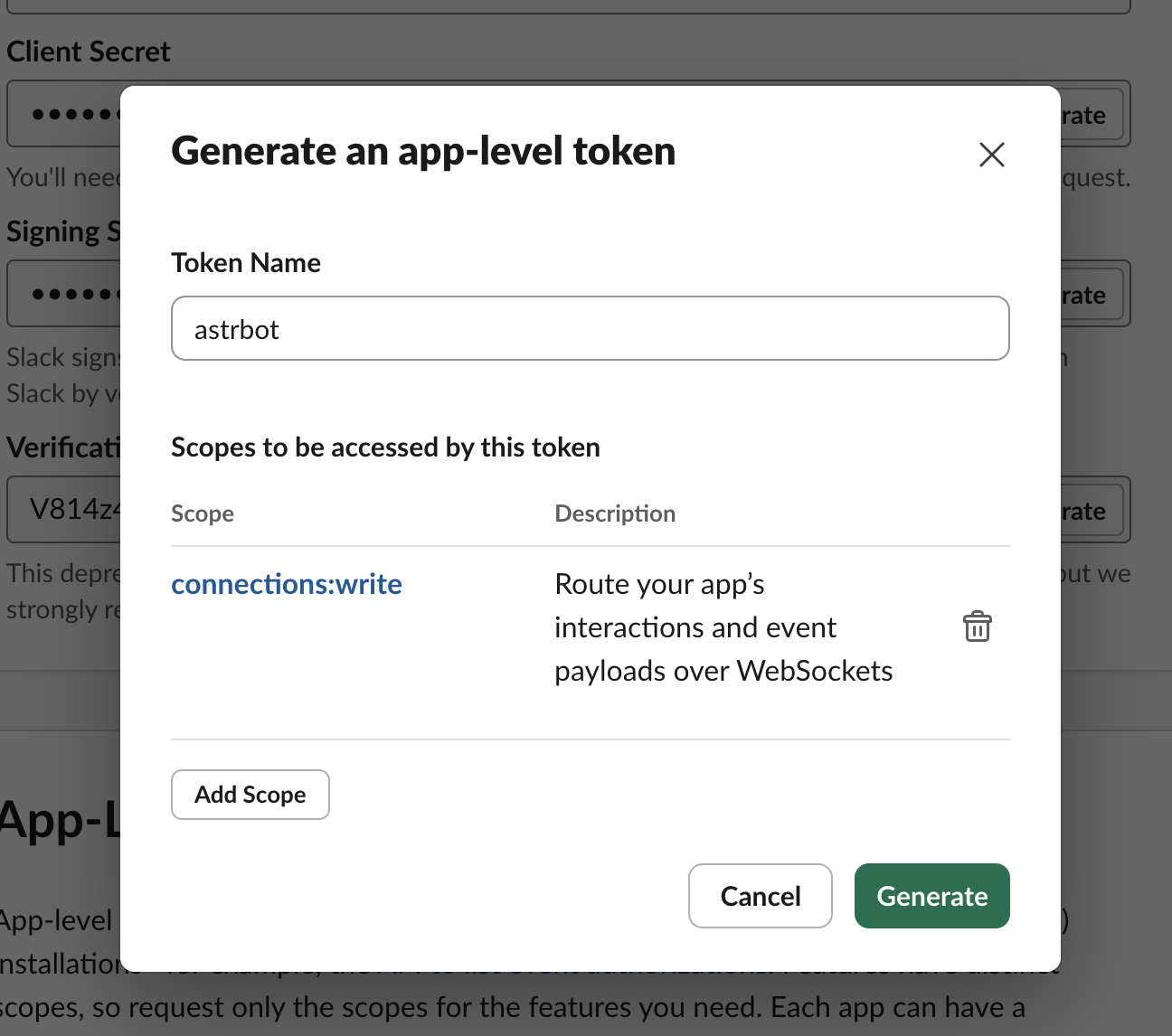
4. 在左边栏 Basic Information 页下,找到 App-Level Tokens,点击 「Generate Token and Scopes」。Token Name 任意输入,点击 Add Scope,选择 `connections:write`,然后点击 「Generate」,点击 Copy 将结果复制到 AstrBot 配置页的 app_token 处。
|
||
|
||
|
||
|
||
5. 在左边栏 OAuth & Permissions 页下,在 Bot Token Scopes 下方添加如下权限:
|
||
- channels:history
|
||
- channels:read
|
||
- channels:write.invites
|
||
- chat:write
|
||
- chat:write.customize
|
||
- chat:write.public
|
||
- files:read
|
||
- files:write
|
||
- groups:history
|
||
- groups:read
|
||
- groups:write
|
||
- im:history
|
||
- im:read
|
||
- im:write
|
||
- reactions:read
|
||
- reactions:write
|
||
- users:read
|
||
|
||
6. 在左边栏 OAuth & Permissions 页下,在 Oauth Token 处点击 `Install to xxx`(xxx 是您工作区的名字)。然后复制生成的 Bot User OAuth Token 到平台适配器配置的 bot_token 处。
|
||
|
||
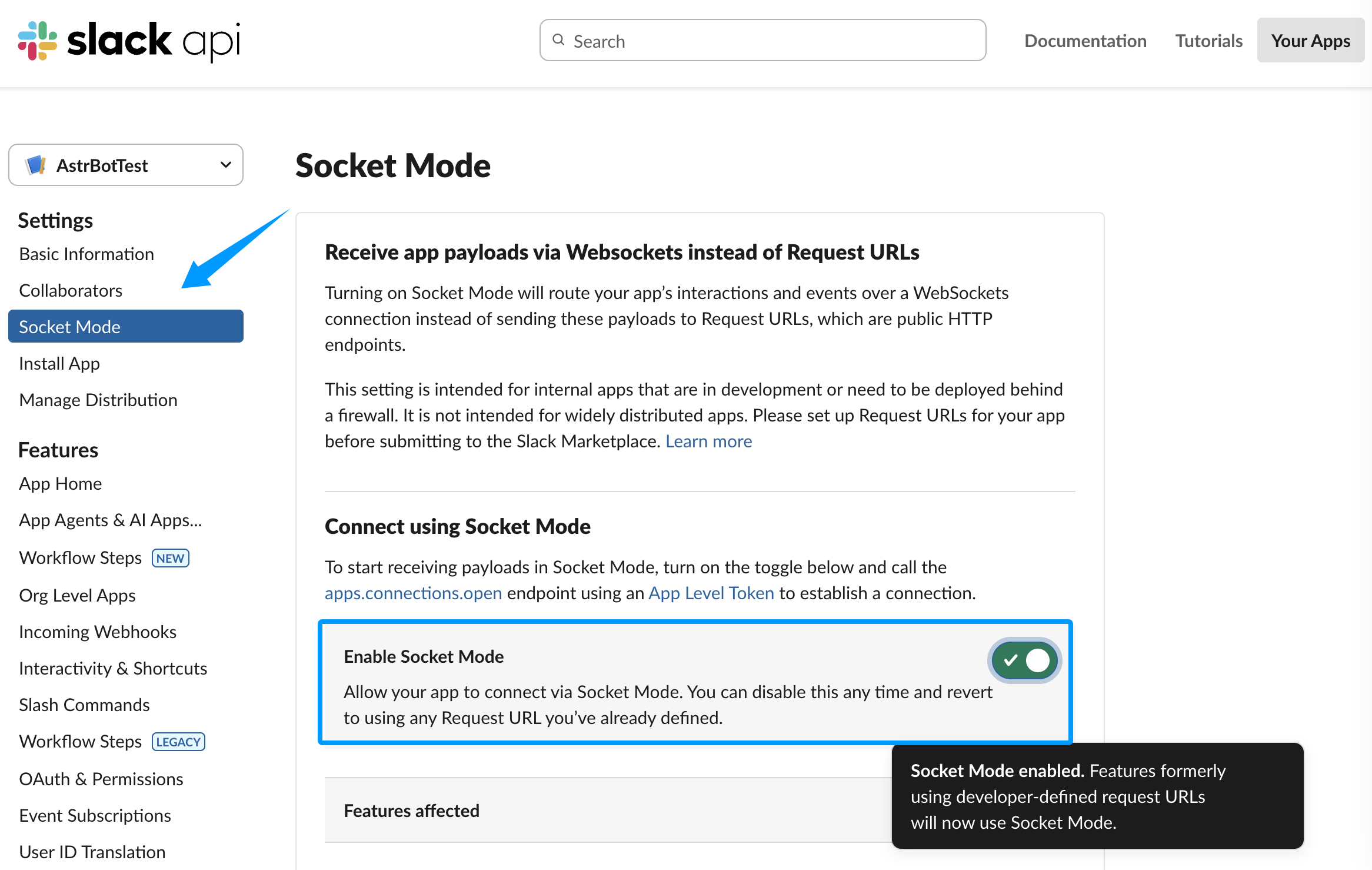
7. (仅 Socket 需要)在左边栏 Socket Mode 页下,开启 Enable Socket Mode。
|
||
|
||
|
||
|
||
## 启动平台适配器
|
||
|
||
现在,配置已经完成。如果您使用的是 Socket 模式,那么直接点击配置的右下角的保存按钮即可。
|
||
|
||
如果您使用的是 Webhook 模式,请保持 `统一 Webhook 模式 (unified_webhook_mode)` 为开启状态。
|
||
|
||
> [!TIP]
|
||
> v4.8.0 之前没有 `统一 Webhook 模式`,请填写以下配置项:
|
||
> Slack Webhook Host、Slack Webhook Port 和 Slack Webhook Path
|
||
|
||
## 开启事件接收
|
||
|
||
新建平台适配器成功后,返回到 Slack 设置,在左边栏 Event Subscriptions 页下,点击 Enable Events 启用事件接收。
|
||
|
||
如果您使用的是 Webhook 模式:
|
||
|
||
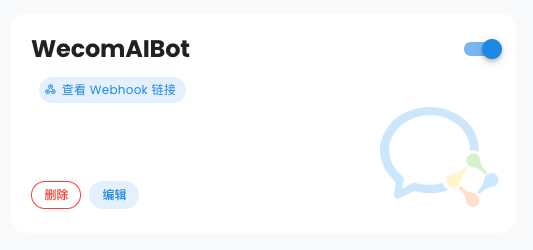
- 如果开启了 `统一 Webhook 模式`,点击保存之后,AstrBot 将会自动为你生成唯一的 Webhook 回调链接,你可以在日志中或者 WebUI 的机器人页的卡片上找到,将该链接填入 `Request URL` 输入框中。
|
||
|
||
|
||
|
||
- 如果没有开启 `统一 Webhook 模式`,请在 `Request URL` 输入框中输入 `https://您的域名/astrbot-slack-webhook/callback`。
|
||
|
||
> [!TIP]
|
||
> Webhook 模式下,您需要先在 DNS 服务商处设置好域名,然后使用反向代理软件将请求转发到 AstrBot 所在服务器的 `6185` 端口(如果开启了统一 Webhook 模式)或配置指定的端口(如果没有开启统一 Webhook 模式)。或者您可以使用 Cloudflare Tunnel。具体教程请参考网络资源,本教程不赘述。
|
||
|
||
启用后,在下方的 Subscribe to bot events 处,点击 Add Bot User Event,添加如下事件:
|
||
|
||
1. channel_created
|
||
2. channel_deleted
|
||
3. channel_left
|
||
4. member_joined_channel
|
||
5. member_left_channel
|
||
6. message.channels
|
||
7. message.groups
|
||
8. message.im
|
||
9. reaction_added
|
||
10. reaction_removed
|
||
11. team_join
|
||
|
||
## 测试成功性
|
||
|
||
进入您刚刚添加的 Slack 工作区,进入需要用到 Bot 的频道,然后 @ 您刚刚创建的应用。然后点击 Slackbot 随后发送的消息中的 添加 按钮来添加到工作区中。然后,@ 应用,输入 `/help`,如果能够成功回复,说明测试成功。
|
||
|
||
如果有疑问,请[提交 Issue](https://github.com/AstrBotDevs/AstrBot/issues)。
|