mirror of
https://github.com/AstrBotDevs/AstrBot
synced 2026-07-17 01:49:15 +08:00
 a40a5fe18c
* docs: 补充 select_knowledgebase 及 _special 字段文档

在插件配置文档中添加 select_knowledgebase 的说明(返回 list,
支持多选),并列出 AstrBot Core 内部使用的其他 _special 值供参考。

* docs: 优化 _special 字段文档表达

标注内部 _special 值为不稳定实现,请勿在插件中使用;
说明 select_agent_runner_provider:* 中 * 的含义;
修正英文措辞。
219 lines
8.0 KiB
Markdown
219 lines
8.0 KiB
Markdown
|
||
# 插件配置
|
||
|
||
随着插件功能的增加,可能需要定义一些配置以让用户自定义插件的行为。
|
||
|
||
AstrBot 提供了“强大”的配置解析和可视化功能。能够让用户在管理面板上直接配置插件,而不需要修改代码。
|
||
|
||
## 配置定义
|
||
|
||
要注册配置,首先需要在您的插件目录下添加一个 `_conf_schema.json` 的 json 文件。
|
||
|
||
文件内容是一个 `Schema`(模式),用于表示配置。Schema 是 json 格式的,例如上图的 Schema 是:
|
||
|
||
```json
|
||
{
|
||
"token": {
|
||
"description": "Bot Token",
|
||
"type": "string",
|
||
},
|
||
"sub_config": {
|
||
"description": "测试嵌套配置",
|
||
"type": "object",
|
||
"hint": "xxxx",
|
||
"items": {
|
||
"name": {
|
||
"description": "testsub",
|
||
"type": "string",
|
||
"hint": "xxxx"
|
||
},
|
||
"id": {
|
||
"description": "testsub",
|
||
"type": "int",
|
||
"hint": "xxxx"
|
||
},
|
||
"time": {
|
||
"description": "testsub",
|
||
"type": "int",
|
||
"hint": "xxxx",
|
||
"default": 123
|
||
}
|
||
}
|
||
}
|
||
}
|
||
```
|
||
|
||
- `type`: **此项必填**。配置的类型。支持 `string`, `text`, `int`, `float`, `bool`, `object`, `list`, `dict`, `template_list`。当类型为 `text` 时,将会可视化为一个更大的可拖拽宽高的 textarea 组件,以适应大文本。
|
||
- `description`: 可选。配置的描述。建议一句话描述配置的行为。
|
||
- `hint`: 可选。配置的提示信息,表现在上图中右边的问号按钮,当鼠标悬浮在问号按钮上时显示。
|
||
- `obvious_hint`: 可选。配置的 hint 是否醒目显示。如上图的 `token`。
|
||
- `default`: 可选。配置的默认值。如果用户没有配置,将使用默认值。int 是 0,float 是 0.0,bool 是 False,string 是 "",object 是 {},list 是 []。
|
||
- `items`: 可选。如果配置的类型是 `object`,需要添加 `items` 字段。`items` 的内容是这个配置项的子 Schema。理论上可以无限嵌套,但是不建议过多嵌套。
|
||
- `invisible`: 可选。配置是否隐藏。默认是 `false`。如果设置为 `true`,则不会在管理面板上显示。
|
||
- `options`: 可选。一个列表,如 `"options": ["chat", "agent", "workflow"]`。提供下拉列表可选项。
|
||
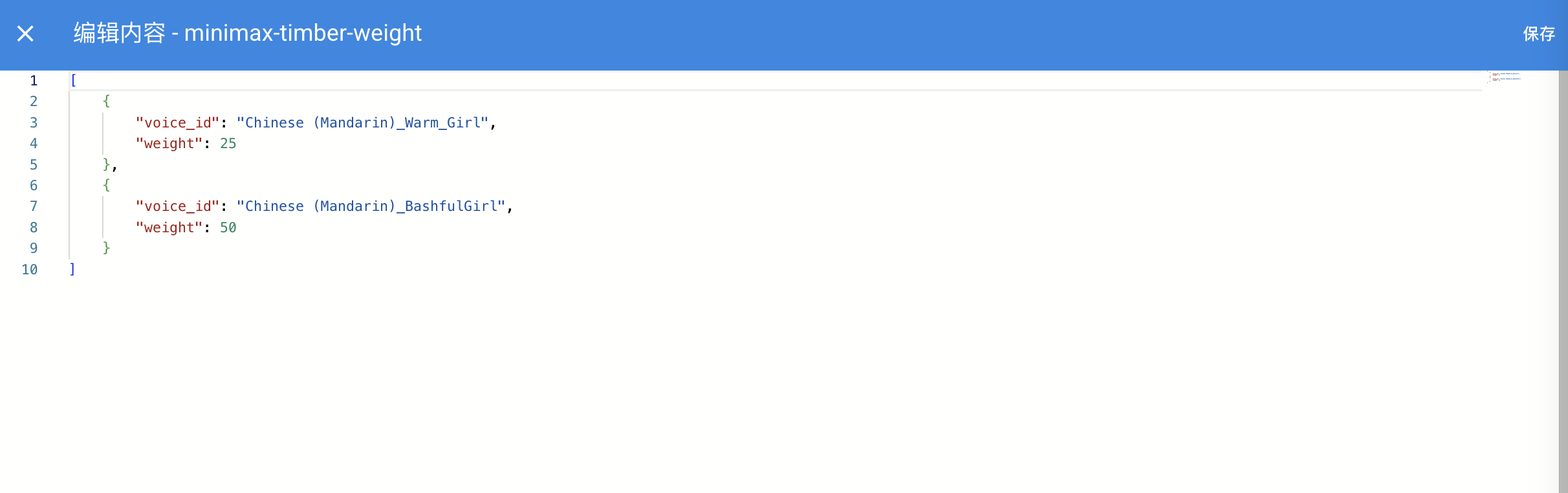
- `editor_mode`: 可选。是否启用代码编辑器模式。需要 AstrBot >= `v3.5.10`, 低于这个版本不会报错,但不会生效。默认是 false。
|
||
- `editor_language`: 可选。代码编辑器的代码语言,默认为 `json`。
|
||
- `editor_theme`: 可选。代码编辑器的主题,可选值有 `vs-light`(默认), `vs-dark`。
|
||
- `_special`: 可选。用于调用 AstrBot 提供的可视化提供商选取、人格选取、知识库选取等功能,详见下文。
|
||
|
||
其中,如果启用了代码编辑器,效果如下图所示:
|
||
|
||

|
||
|
||
|
||
|
||
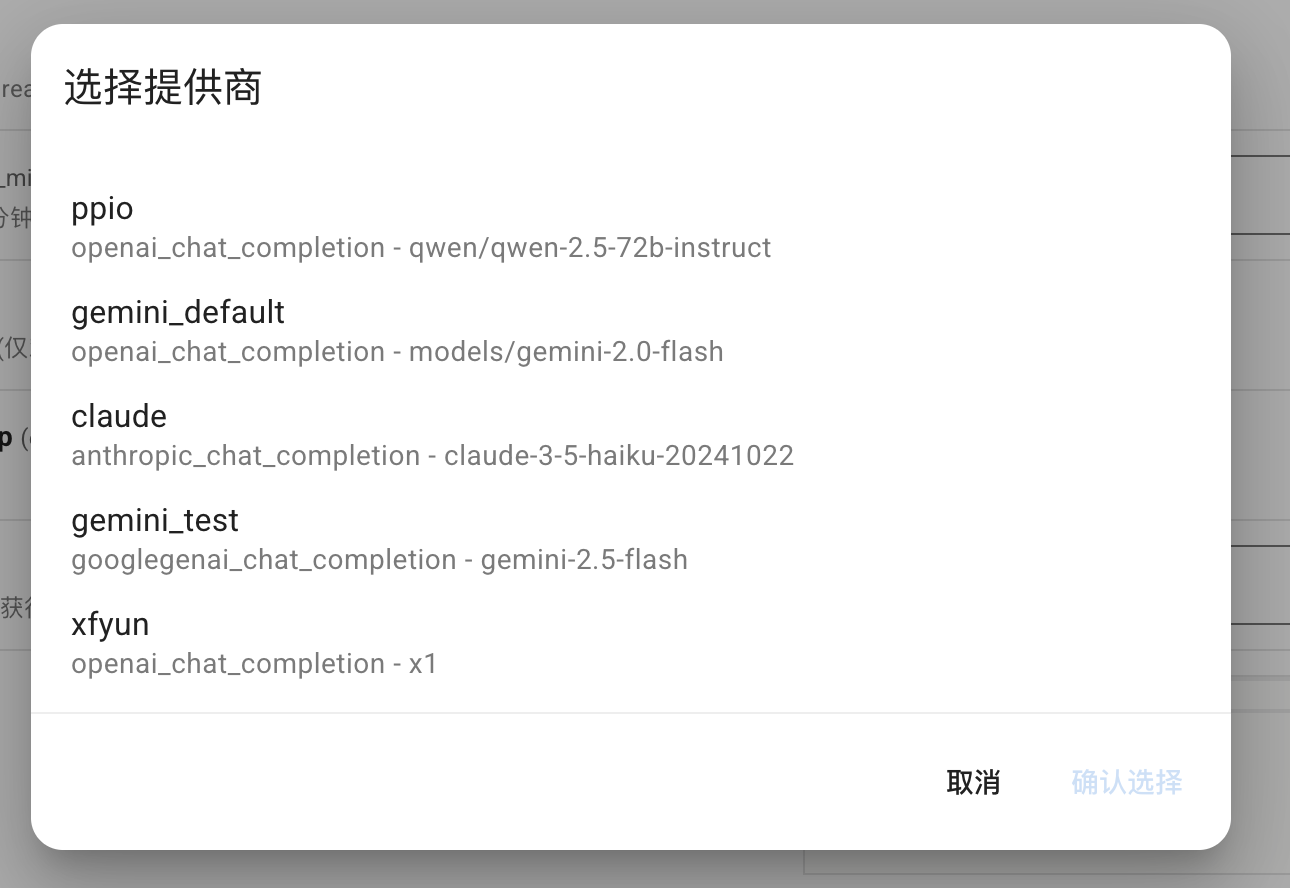
**_special** 字段仅 v4.0.0 之后可用。常用可填写值包括 `select_provider`, `select_provider_tts`, `select_provider_stt`, `select_persona`, `select_knowledgebase`,用于让用户快速选择在 WebUI 上已经配置好的模型提供商、人设、知识库等数据。
|
||
|
||
- `select_provider`、`select_provider_tts`、`select_provider_stt`、`select_persona` 的结果为字符串。
|
||
- `select_knowledgebase` 的结果为 `list` 类型,支持多选,建议将对应配置项的 `type` 设为 `list`,默认值设为 `[]`。
|
||
|
||
> [!NOTE]
|
||
> 此外,AstrBot Core 内部还使用了 `select_providers`、`provider_pool`、`persona_pool`、`select_plugin_set`、`t2i_template`、`get_embedding_dim`、`select_agent_runner_provider:*`(`*` 为运行器类型占位符)等 `_special` 值。这些属于内部实现,随时可能变动,请勿在插件中使用。
|
||
|
||
以 `select_provider` 为例,将呈现以下效果:
|
||
|
||
|
||
|
||
### file 类型的 schema
|
||
|
||
在 v4.13.0 之后引入,允许插件定义文件上传配置项,引导用户上传插件所需的文件。
|
||
|
||
```json
|
||
{
|
||
"demo_files": {
|
||
"type": "file",
|
||
"description": "Uploaded files for demo",
|
||
"default": [], // 支持多文件上传,默认值为一个空列表
|
||
"file_types": ["pdf", "docx"] // 允许上传的文件类型列表
|
||
}
|
||
}
|
||
```
|
||
|
||
### dict 类型的 schema
|
||
|
||
用于可视化编辑一个 Python 的 dict 类型的配置。如 AstrBot Core 中的自定义请求体参数配置项:
|
||
|
||
```py
|
||
"custom_extra_body": {
|
||
"description": "自定义请求体参数",
|
||
"type": "dict",
|
||
"items": {},
|
||
"hint": "用于在请求时添加额外的参数,如 temperature、top_p、max_tokens 等。",
|
||
"template_schema": { # 可选填写 template schema,当设置之后,用户可以透过 WebUI 快速编辑。
|
||
"temperature": {
|
||
"name": "Temperature",
|
||
"description": "温度参数",
|
||
"hint": "控制输出的随机性,范围通常为 0-2。值越高越随机。",
|
||
"type": "float",
|
||
"default": 0.6,
|
||
"slider": {"min": 0, "max": 2, "step": 0.1},
|
||
},
|
||
"top_p": {
|
||
"name": "Top-p",
|
||
"description": "Top-p 采样",
|
||
"hint": "核采样参数,范围通常为 0-1。控制模型考虑的概率质量。",
|
||
"type": "float",
|
||
"default": 1.0,
|
||
"slider": {"min": 0, "max": 1, "step": 0.01},
|
||
},
|
||
"max_tokens": {
|
||
"name": "Max Tokens",
|
||
"description": "最大令牌数",
|
||
"hint": "生成的最大令牌数。",
|
||
"type": "int",
|
||
"default": 8192,
|
||
},
|
||
},
|
||
}
|
||
```
|
||
|
||
### template_list 类型的 schema
|
||
|
||
> [!NOTE]
|
||
> v4.10.4 引入。更多信息请查看:[#4208](https://github.com/AstrBotDevs/AstrBot/pull/4208)
|
||
|
||
插件开发者可以在_conf_schema中按照以下格式添加模板配置项(有点类似于原有的嵌套配置)
|
||
|
||
```json
|
||
"field_id": {
|
||
"type": "template_list",
|
||
"description": "Template List Field",
|
||
"templates": {
|
||
"template_1": {
|
||
"name": "Template One",
|
||
"hint":"hint",
|
||
"items": {
|
||
"attr_a": {
|
||
"description": "Attribute A",
|
||
"type": "int",
|
||
"default": 10
|
||
},
|
||
"attr_b": {
|
||
"description": "Attribute B",
|
||
"hint": "This is a boolean attribute",
|
||
"type": "bool",
|
||
"default": true
|
||
}
|
||
}
|
||
},
|
||
"template_2": {
|
||
"name": "Template Two",
|
||
"hint":"hint",
|
||
"items": {
|
||
"attr_c": {
|
||
"description": "Attribute A",
|
||
"type": "int",
|
||
"default": 10
|
||
},
|
||
"attr_d": {
|
||
"description": "Attribute B",
|
||
"hint": "This is a boolean attribute",
|
||
"type": "bool",
|
||
"default": true
|
||
}
|
||
}
|
||
}
|
||
}
|
||
}
|
||
```
|
||
|
||
保存后的 config 为
|
||
|
||
```json
|
||
"field_id": [
|
||
{
|
||
"__template_key": "template_1",
|
||
"attr_a": 10,
|
||
"attr_b": true
|
||
},
|
||
{
|
||
"__template_key": "template_2",
|
||
"attr_c": 10,
|
||
"attr_d": true
|
||
}
|
||
]
|
||
```
|
||
|
||
<img width="1000" alt="image" src="https://github.com/user-attachments/assets/74876d30-11a4-491b-a7a0-8ebe8d603782" />
|
||
|
||
## 在插件中使用配置
|
||
|
||
AstrBot 在载入插件时会检测插件目录下是否有 `_conf_schema.json` 文件,如果有,会自动解析配置并保存在 `data/config/<plugin_name>_config.json` 下(依照 Schema 创建的配置文件实体),并在实例化插件类时传入给 `__init__()`。
|
||
|
||
```py
|
||
from astrbot.api import AstrBotConfig
|
||
|
||
class ConfigPlugin(Star):
|
||
def __init__(self, context: Context, config: AstrBotConfig): # AstrBotConfig 继承自 Dict,拥有字典的所有方法
|
||
super().__init__(context)
|
||
self.config = config
|
||
print(self.config)
|
||
|
||
# 支持直接保存配置
|
||
# self.config.save_config() # 保存配置
|
||
```
|
||
|
||
## 配置更新
|
||
|
||
您在发布不同版本更新 Schema 时,AstrBot 会递归检查 Schema 的配置项,自动为缺失的配置项添加默认值、移除不存在的配置项。
|