mirror of
https://github.com/AstrBotDevs/AstrBot
synced 2026-07-16 17:47:06 +08:00
 b4a32fbda8
- Add 'config' to known zh/en doc structure differences
- Remove trailing whitespace from docs/zh/faq.md
- Remove trailing whitespace from docs/en/dev/plugin-platform-adapter.md
- Ensure all README files end with newline
305 lines
18 KiB
Markdown
305 lines
18 KiB
Markdown

|
||
|
||
<div align="center">
|
||
|
||
<a href="https://github.com/AstrBotDevs/AstrBot/blob/master/README.md">English</a> |
|
||
<a href="https://github.com/AstrBotDevs/AstrBot/blob/master/README_zh-TW.md">繁體中文</a> |
|
||
<a href="https://github.com/AstrBotDevs/AstrBot/blob/master/README_zh.md">简体中文</a> |
|
||
<a href="https://github.com/AstrBotDevs/AstrBot/blob/master/README_fr.md">Français</a> |
|
||
<a href="https://github.com/AstrBotDevs/AstrBot/blob/master/README_ru.md">Русский</a>
|
||
|
||
<div>
|
||
<a href="https://trendshift.io/repositories/12875" target="_blank"><img src="https://trendshift.io/api/badge/repositories/12875" alt="Soulter%2FAstrBot | Trendshift" style="width: 250px; height: 55px;" width="250" height="55"/></a>
|
||
<a href="https://hellogithub.com/repository/AstrBotDevs/AstrBot" target="_blank"><img src="https://api.hellogithub.com/v1/widgets/recommend.svg?rid=d127d50cd5e54c5382328acc3bb25483&claim_uid=ZO9by7qCXgSd6Lp&t=2" alt="Featured|HelloGitHub" style="width: 250px; height: 54px;" width="250" height="54" /></a>
|
||
</div>
|
||
|
||
<br>
|
||
|
||
<div>
|
||
<img src="https://img.shields.io/github/v/release/AstrBotDevs/AstrBot?color=76bad9" href="https://github.com/AstrBotDevs/AstrBot/releases/latest">
|
||
<img src="https://img.shields.io/badge/python-3.10+-blue.svg" alt="python">
|
||
<img src="https://deepwiki.com/badge.svg" href="https://deepwiki.com/AstrBotDevs/AstrBot">
|
||
<a href="https://zread.ai/AstrBotDevs/AstrBot" target="_blank"><img src="https://img.shields.io/badge/Ask_Zread-_.svg?style=flat&color=00b0aa&labelColor=000000&logo=data%3Aimage%2Fsvg%2Bxml%3Bbase64%2CPHN2ZyB3aWR0aD0iMTYiIGhlaWdodD0iMTYiIHZpZXdCb3g9IjAgMCAxNiAxNiIgZmlsbD0ibm9uZSIgeG1sbnM9Imh0dHA6Ly93d3cudzMub3JnLzIwMDAvc3ZnIj4KPHBhdGggZD0iTTQuOTYxNTYgMS42MDAxSDIuMjQxNTZDMS44ODgxIDEuNjAwMSAxLjYwMTU2IDEuODg2NjQgMS42MDE1NiAyLjI0MDFWNC45NjAxQzEuNjAxNTYgNS4zMTM1NiAxLjg4ODEgNS42MDAxIDIuMjQxNTYgNS42MDAxSDQuOTYxNTZDNS4zMTUwMiA1LjYwMDEgNS42MDE1NiA1LjMxMzU2IDUuNjAxNTYgNC45NjAxVjIuMjQwMUM1LjYwMTU2IDEuODg2NjQgNS4zMTUwMiAxLjYwMDEgNC45NjE1NiAxLjYwMDFaIiBmaWxsPSIjZmZmIi8%2BCjxwYXRoIGQ9Ik00Ljk2MTU2IDEwLjM5OTlIMi4yNDE1NkMxLjg4ODEgMTAuMzk5OSAxLjYwMTU2IDEwLjY4NjQgMS42MDE1NiAxMS4wMzk5VjEzLjc1OTlDMS42MDE1NiAxNC4xMTM0IDEuODg4MSAxNC4zOTk5IDIuMjQxNTYgMTQuMzk5OUg0Ljk2MTU2QzUuMzE1MDIgMTQuMzk5OSA1LjYwMTU2IDE0LjExMzQgNS42MDE1NiAxMy43NTk5VjExLjAzOTlDNS42MDE1NiAxMC42ODY0IDUuMzE1MDIgMTAuMzk5OSA0Ljk2MTU2IDEwLjM5OTlaIiBmaWxsPSIjZmZmIi8%2BCjxwYXRoIGQ9Ik0xMy43NTg0IDEuNjAwMUgxMS4wMzg0QzEwLjY4NSAxLjYwMDEgMTAuMzk4NCAxLjg4NjY0IDEwLjM5ODQgMi4yNDAxVjQuOTYwMUMxMC4zOTg0IDUuMzEzNTYgMTAuNjg1IDUuNjAwMSAxMS4wMzg0IDUuNjAwMUgxMy43NTg0QzE0LjExMTkgNS42MDAxIDE0LjM5ODQgNS4zMTM1NiAxNC4zOTg0IDQuOTYwMVYyLjI0MDFDMTQuMzk4NCAxLjg4NjY0IDE0LjExMTkgMS42MDAxIDEzLjc1ODQgMS42MDAxWiIgZmlsbD0iI2ZmZiIvPgo8cGF0aCBkPSJNNCAxMkwxMiA0TDQgMTJaIiBmaWxsPSIjZmZmIi8%2BCjxwYXRoIGQ9Ik00IDEyTDEyIDQiIHN0cm9rZT0iI2ZmZiIgc3Ryb2tlLXdpZHRoPSIxLjUiIHN0cm9rZS1saW5lY2FwPSJyb3VuZCIvPgo8L3N2Zz4K&logoColor=ffffff" alt="zread"/></a>
|
||
<a href="https://hub.docker.com/r/soulter/astrbot"><img alt="Docker pull" src="https://img.shields.io/docker/pulls/soulter/astrbot.svg?color=76bad9"/></a>
|
||
<img src="https://img.shields.io/badge/dynamic/json?url=https%3A%2F%2Fapi.soulter.top%2Fastrbot%2Fplugin-num&query=%24.result&suffix=%E5%80%8B&label=%E3%83%97%E3%83%A9%E3%82%B0%E3%82%A4%E3%83%B3%E3%82%B9%E3%83%88%E3%82%A2&cacheSeconds=3600">
|
||
<img src="https://gitcode.com/Soulter/AstrBot/star/badge.svg" href="https://gitcode.com/Soulter/AstrBot">
|
||
</div>
|
||
|
||
<br>
|
||
|
||
<a href="https://astrbot.app/">ホーム</a> |
|
||
<a href="https://astrbot.app/">ドキュメント</a> |
|
||
<a href="https://blog.astrbot.app/">ブログ</a> |
|
||
<a href="https://astrbot.featurebase.app/roadmap">ロードマップ</a> |
|
||
<a href="https://github.com/AstrBotDevs/AstrBot/issues">課題の提出</a>
|
||
<a href="mailto:community@astrbot.app">Email</a>
|
||
|
||
</div>
|
||
|
||
AstrBotは、オープンソースのオールインワンAgentic個人およびグループチャットアシスタントです。QQ、Telegram、WeCom(企業微信)、Lark(飛書)、DingTalk(釘釘)、Slackなど、数十種類の主要なインスタントメッセージングソフトウェアに導入できます。さらに、OpenWebUIに似た軽量のChatUIも組み込まれており、個人、開発者、チーム向けに信頼性が高く拡張可能な会話型AIインフラストラクチャを提供します。個人のAIパートナー、インテリジェントなカスタマーサービス、自動化アシスタント、または企業のナレッジベースであっても、AstrBotはインスタントメッセージングプラットフォームのワークフロー内でAIアプリケーションを迅速に構築することを可能にします。
|
||
|
||

|
||
|
||
## 主な機能
|
||
|
||
1. 💯 無料 & オープンソース。
|
||
2. ✨ AI大規模モデル対話、マルチモーダル、エージェント、MCP、スキル、ナレッジベース、人格設定、対話の自動圧縮。
|
||
3. 🤖 Dify、Alibaba Bailian(阿里雲百煉)、Cozeなどのエージェントプラットフォームとの連携をサポート。
|
||
4. 🌐 マルチプラットフォーム対応:QQ、WeCom、Lark、DingTalk、WeChat公式アカウント、Telegram、Slack、その他[多数](#対応メッセージングプラットフォーム)。
|
||
5. 📦 プラグイン拡張:1000以上のプラグインがワンクリックでインストール可能。
|
||
6. 🛡️ [Agent Sandbox](https://docs.astrbot.app/use/astrbot-agent-sandbox.html):隔離された環境で、あらゆるコードの安全な実行、シェル呼び出し、セッションレベルのリソース再利用が可能。
|
||
7. 💻 WebUIサポート。
|
||
8. 🌈 Web ChatUIサポート:ChatUIにはプロキシサンドボックス、Web検索などが組み込まれています。
|
||
9. 🌐 国際化(i18n)サポート。
|
||
|
||
<br>
|
||
|
||
<table align="center">
|
||
<tr align="center">
|
||
<th>💙 ロールプレイ & 感情的な付き添い</th>
|
||
<th>✨ 能動的エージェント</th>
|
||
<th>🚀 汎用Agentic能力</th>
|
||
<th>🧩 1000+ コミュニティプラグイン</th>
|
||
</tr>
|
||
<tr>
|
||
<td align="center"><p align="center"><img width="984" height="1746" alt="99b587c5d35eea09d84f33e6cf6cfd4f" src="https://github.com/user-attachments/assets/89196061-3290-458d-b51f-afa178049f84" /></p></td>
|
||
<td align="center"><p align="center"><img width="976" height="1612" alt="c449acd838c41d0915cc08a3824025b1" src="https://github.com/user-attachments/assets/f75368b4-e022-41dc-a9e0-131c3e73e32e" /></p></td>
|
||
<td align="center"><p align="center"><img width="974" height="1732" alt="image" src="https://github.com/user-attachments/assets/e22a3968-87d7-4708-a7cd-e7f198c7c32e" /></p></td>
|
||
<td align="center"><p align="center"><img width="976" height="1734" alt="image" src="https://github.com/user-attachments/assets/0952b395-6b4a-432a-8a50-c294b7f89750" /></p></td>
|
||
</tr>
|
||
</table>
|
||
|
||
## クイックスタート
|
||
|
||
### ワンクリックデプロイ
|
||
|
||
AstrBotをすぐに試してみたい方で、コマンドラインに慣れており、`uv`環境を自分でインストールできる方には、`uv`を使用したワンクリックデプロイをお勧めします⚡️。
|
||
|
||
```bash
|
||
uv tool install astrbot
|
||
astrbot init # 初回のみ環境初期化のために実行
|
||
astrbot run # astrbot run --backend-only バックエンドサービスのみ起動
|
||
|
||
# 開発版のインストール(修正や新機能が多いですが、不安定な場合があります。開発者向け)
|
||
uv tool install git+https://github.com/AstrBotDevs/AstrBot@dev
|
||
```
|
||
|
||
> [uv](https://docs.astral.sh/uv/)のインストールが必要です。
|
||
|
||
> [!NOTE]
|
||
> macOSユーザーの場合:macOSのセキュリティチェックにより、`astrbot`コマンドの初回実行に時間がかかる場合があります(約10〜20秒)。
|
||
|
||
`astrbot`の更新:
|
||
|
||
```bash
|
||
uv tool upgrade astrbot
|
||
```
|
||
|
||
### Dockerデプロイ
|
||
|
||
コンテナに精通しており、より安定的で本番環境に適したデプロイ方法を好むユーザーには、Docker / Docker Composeを使用したAstrBotのデプロイをお勧めします。
|
||
|
||
公式ドキュメントの[Dockerを使用してAstrBotをデプロイする](https://astrbot.app/deploy/astrbot/docker.html)を参照してください。
|
||
|
||
### RainYun(雨云)でのデプロイ
|
||
|
||
サーバーを自分で管理せずにAstrBotをワンクリックでデプロイしたいユーザーには、RainYunのワンクリッククラウドデプロイサービスをお勧めします☁️:
|
||
|
||
[](https://app.rainyun.com/apps/rca/store/5994?ref=NjU1ODg0)
|
||
|
||
### デスクトップクライアントデプロイ
|
||
|
||
デスクトップでAstrBotを使用し、主にChatUIを入り口として使用したいユーザーには、AstrBot Appをお勧めします。
|
||
|
||
[AstrBot-desktop](https://github.com/AstrBotDevs/AstrBot-desktop)にアクセスしてダウンロードおよびインストールしてください。この方法はデスクトップ利用向けであり、サーバーシナリオには推奨されません。
|
||
|
||
### ランチャーデプロイ
|
||
|
||
同じくデスクトップ向けで、迅速にデプロイし、環境を分離して複数起動したいユーザーには、AstrBot Launcherをお勧めします。
|
||
|
||
[AstrBot Launcher](https://github.com/Raven95676/astrbot-launcher)にアクセスしてダウンロードおよびインストールしてください。
|
||
|
||
### Replitでのデプロイ
|
||
|
||
Replitデプロイはコミュニティによって維持されており、オンラインデモや軽量な試用シナリオに適しています。
|
||
|
||
[](https://repl.it/github/AstrBotDevs/AstrBot)
|
||
|
||
### AUR
|
||
|
||
AUR方式はArch Linuxユーザー向けで、システムパッケージマネージャーを通じてAstrBotをインストールしたい場合に適しています。
|
||
|
||
ターミナルで以下のコマンドを実行して`astrbot-git`パッケージをインストールすると、起動して使用できます。
|
||
|
||
```bash
|
||
yay -S astrbot-git
|
||
```
|
||
|
||
**その他のデプロイ方法**
|
||
|
||
パネル化や高度なカスタマイズデプロイが必要な場合は、[BT Panel(宝塔パネル)](https://astrbot.app/deploy/astrbot/btpanel.html)(BT Panelアプリストアインストール)、[1Panel](https://astrbot.app/deploy/astrbot/1panel.html)(1Panelアプリストアインストール)、[CasaOS](https://astrbot.app/deploy/astrbot/casaos.html)(NAS / ホームサーバーの視覚的デプロイ)、および[手動デプロイ](https://astrbot.app/deploy/astrbot/cli.html)(ソースコードと`uv`に基づく完全なカスタムインストール)を参照してください。
|
||
|
||
## 対応メッセージングプラットフォーム
|
||
|
||
AstrBotを普段使用しているチャットプラットフォームに接続しましょう。
|
||
|
||
| プラットフォーム | 管理者 |
|
||
|---------|---------------|
|
||
| **QQ** | 公式管理 |
|
||
| **OneBot v11** | 公式管理 |
|
||
| **Telegram** | 公式管理 |
|
||
| **WeComアプリ & WeComボット** | 公式管理 |
|
||
| **WeChatカスタマーサービス & WeChat公式アカウント** | 公式管理 |
|
||
| **Lark (飛書)** | 公式管理 |
|
||
| **DingTalk (釘釘)** | 公式管理 |
|
||
| **Slack** | 公式管理 |
|
||
| **Discord** | 公式管理 |
|
||
| **LINE** | 公式管理 |
|
||
| **Satori** | 公式管理 |
|
||
| **Misskey** | 公式管理 |
|
||
| **Whatsapp (対応予定)** | 公式管理 |
|
||
| [**Matrix**](https://github.com/stevessr/astrbot_plugin_matrix_adapter) | コミュニティ管理 |
|
||
| [**KOOK**](https://github.com/wuyan1003/astrbot_plugin_kook_adapter) | コミュニティ管理 |
|
||
| [**VoceChat**](https://github.com/HikariFroya/astrbot_plugin_vocechat) | コミュニティ管理 |
|
||
|
||
## 対応モデルプロバイダー
|
||
|
||
| プロバイダー | タイプ |
|
||
|---------|---------------|
|
||
| カスタム | OpenAI API互換の任意のサービス |
|
||
| OpenAI | LLM |
|
||
| Anthropic | LLM |
|
||
| Google Gemini | LLM |
|
||
| Moonshot AI | LLM |
|
||
| Zhipu AI (智譜AI) | LLM |
|
||
| DeepSeek | LLM |
|
||
| Ollama (ローカル) | LLM |
|
||
| LM Studio (ローカル) | LLM |
|
||
| [AIHubMix](https://aihubmix.com/?aff=4bfH) | LLM (APIゲートウェイ, 全モデル対応) |
|
||
| [Uyun AI (優雲智算)](https://www.compshare.cn/?ytag=GPU_YY-gh_astrbot&referral_code=FV7DcGowN4hB5UuXKgpE74) | LLM (APIゲートウェイ, 全モデル対応) |
|
||
| [SiliconFlow (硅基流動)](https://docs.siliconflow.cn/cn/usercases/use-siliconcloud-in-astrbot) | LLM (APIゲートウェイ, 全モデル対応) |
|
||
| [PPIO](https://ppio.com/user/register?invited_by=AIOONE) | LLM (APIゲートウェイ, 全モデル対応) |
|
||
| [302.AI](https://share.302.ai/rr1M3l) | LLM (APIゲートウェイ, 全モデル対応)|
|
||
| [TokenPony (小馬算力)](https://www.tokenpony.cn/3YPyf) | LLM (APIゲートウェイ, 全モデル対応)|
|
||
| ModelScope | LLM |
|
||
| OneAPI | LLM |
|
||
| Dify | LLMOpsプラットフォーム |
|
||
| Alibaba Bailian (阿里雲百煉) | LLMOpsプラットフォーム |
|
||
| Coze | LLMOpsプラットフォーム |
|
||
| OpenAI Whisper | 音声認識 (STT) |
|
||
| SenseVoice | 音声認識 (STT) |
|
||
| OpenAI TTS | 音声合成 (TTS) |
|
||
| Gemini TTS | 音声合成 (TTS) |
|
||
| GPT-Sovits-Inference | 音声合成 (TTS) |
|
||
| GPT-Sovits | 音声合成 (TTS) |
|
||
| FishAudio | 音声合成 (TTS) |
|
||
| Edge TTS | 音声合成 (TTS) |
|
||
| Alibaba Bailian TTS | 音声合成 (TTS) |
|
||
| Azure TTS | 音声合成 (TTS) |
|
||
| Minimax TTS | 音声合成 (TTS) |
|
||
| Volcengine TTS (火山エンジン) | 音声合成 (TTS) |
|
||
|
||
## ❤️ Sponsors
|
||
|
||
<p align="center">
|
||
<img alt="sponsors" src="https://sponsors.astrbot.app/?v=1">
|
||
</p>
|
||
|
||
|
||
## ❤️ 貢献
|
||
|
||
IssueやPull Requestは大歓迎です!変更をこのプロジェクトに送信してください :)
|
||
|
||
### 貢献方法
|
||
|
||
問題の確認やPR(プルリクエスト)のレビューを通じて貢献できます。コミュニティの貢献を促進するために、あらゆる問題やPRへの参加を歓迎します。もちろん、これらは提案に過ぎず、どのような方法で貢献しても構いません。新機能の追加については、まずIssueで議論してください。
|
||
機能的なPRは`dev`ブランチにマージすることをお勧めします。テスト修正後にメインブランチにマージされ、新しいバージョンとしてリリースされます。
|
||
コンフリクトを減らすために、以下のことを推奨します:
|
||
1. 作業ブランチは`dev`ブランチに基づいて作成し、`main`ブランチで直接作業することは避けてください。
|
||
2. PRを送信する際は、ターゲットブランチとして`dev`ブランチを選択してください。
|
||
3. 定期的に`dev`ブランチをローカルに同期し、`git pull`を頻繁に使用してください。
|
||
|
||
### 開発環境
|
||
|
||
AstrBotはコードのフォーマットとチェックに`ruff`を使用しています。
|
||
|
||
```bash
|
||
git clone https://github.com/AstrBotDevs/AstrBot
|
||
git switch dev # 開発ブランチに切り替え
|
||
pip install pre-commit # または uv tool install pre-commit
|
||
pre-commit install
|
||
```
|
||
ローカルでのインストールとテストには`uv`の使用をお勧めします。
|
||
```bash
|
||
uv tool install -e . --force
|
||
astrbot init
|
||
astrbot run
|
||
```
|
||
フロントエンドのデバッグ
|
||
```bash
|
||
astrbot run --backend-only
|
||
cd dashboard
|
||
bun install # または pnpm など
|
||
bun dev
|
||
```
|
||
|
||
### QQグループ
|
||
|
||
- 9群: 1076659624 (新)
|
||
- 10群: 1078079676 (新)
|
||
- 1群:322154837
|
||
- 3群:630166526
|
||
- 5群:822130018
|
||
- 6群:753075035
|
||
- 7群:743746109
|
||
- 8群:1030353265
|
||
- 開発者群(雑談):975206796
|
||
- 開発者群(公式):1039761811
|
||
|
||
### Discordチャンネル
|
||
|
||
- [Discord](https://discord.gg/hAVk6tgV36)
|
||
|
||
## ❤️ Special Thanks
|
||
|
||
AstrBotに貢献してくださったすべてのコントリビューターとプラグイン開発者に感謝します ❤️
|
||
|
||
<a href="https://github.com/AstrBotDevs/AstrBot/graphs/contributors">
|
||
<img src="https://contrib.rocks/image?repo=AstrBotDevs/AstrBot&max=200&columns=14" />
|
||
</a>
|
||
|
||
さらに、このプロジェクトの誕生は、以下のオープンソースプロジェクトの助けなしにはあり得ませんでした:
|
||
|
||
- [NapNeko/NapCatQQ](https://github.com/NapNeko/NapCatQQ) - 偉大な猫フレームワーク
|
||
|
||
オープンソースプロジェクトのフレンドリーリンク:
|
||
|
||
- [NoneBot2](https://github.com/nonebot/nonebot2) - 優れたPython非同期チャットボットフレームワーク
|
||
- [Koishi](https://github.com/koishijs/koishi) - 優れたNode.jsチャットボットフレームワーク
|
||
- [MaiBot](https://github.com/Mai-with-u/MaiBot) - 優れた擬人化AIチャットボット
|
||
- [nekro-agent](https://github.com/KroMiose/nekro-agent) - 優れたエージェントチャットボット
|
||
- [LangBot](https://github.com/langbot-app/LangBot) - 優れたマルチプラットフォームAIチャットボット
|
||
- [ChatLuna](https://github.com/ChatLunaLab/chatluna) - 優れたマルチプラットフォームAIチャットボットKoishiプラグイン
|
||
- [Operit AI](https://github.com/AAswordman/Operit) - 優れたAIインテリジェントアシスタントAndroidアプリ
|
||
|
||
## ⭐ Star History
|
||
|
||
> [!TIP]
|
||
> もしこのプロジェクトがあなたの生活や仕事の助けになったなら、あるいはこのプロジェクトの将来の発展に関心があるなら、プロジェクトにStarを付けてください。これは私たちがこのオープンソースプロジェクトを維持するための原動力となります <3
|
||
|
||
<div align="center">
|
||
|
||
[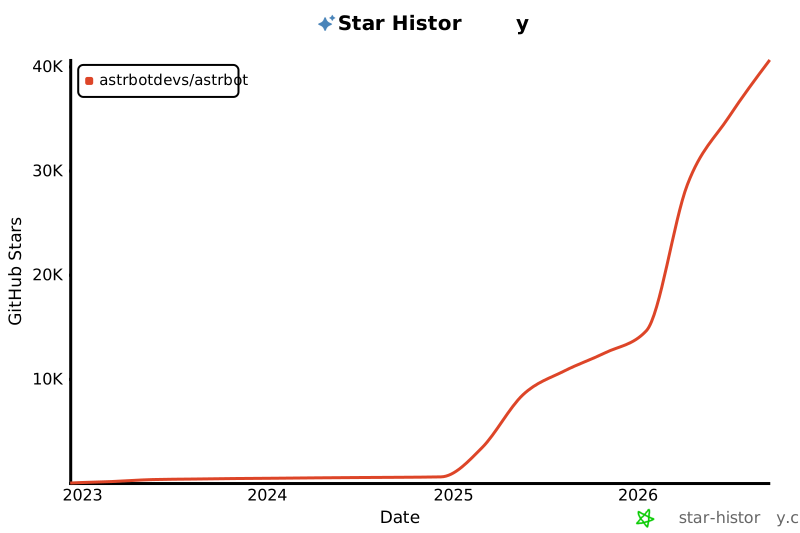](https://star-history.com/#astrbotdevs/astrbot&Date)
|
||
|
||
</div>
|
||
|
||
<div align="center">
|
||
|
||
_付き添いと能力は決して対立するものであってはなりません。私たちが創造したいのは、感情を理解し、寄り添いながらも、確実に仕事を遂行できるロボットです。_
|
||
|
||
_私は、高性能ですから!_
|
||
|
||
<img src="https://files.astrbot.app/watashiwa-koseino-desukara.gif" width="100"/>
|
||
|
||
</div>
|