mirror of
https://github.com/AstrBotDevs/AstrBot
synced 2026-07-17 01:49:15 +08:00

139 lines
5.5 KiB
Markdown
139 lines
5.5 KiB
Markdown
---
|
|
outline: deep
|
|
---
|
|
|
|
# AstrBot Plugin Development Guide 🌠
|
|
|
|
Welcome to the AstrBot Plugin Development Guide! This section will guide you through developing AstrBot plugins. Before we begin, we hope you have the following foundational knowledge:
|
|
|
|
1. Some experience with Python programming.
|
|
2. Some experience with Git and GitHub.
|
|
|
|
## Environment Setup
|
|
|
|
### Obtain the Plugin Template
|
|
|
|
1. Open the AstrBot plugin template: [helloworld](https://github.com/Soulter/helloworld)
|
|
2. Click `Use this template` in the upper right corner
|
|
3. Then click `Create new repository`.
|
|
4. Fill in your plugin name in the `Repository name` field. Plugin naming conventions:
|
|
- Recommended to start with `astrbot_plugin_`;
|
|
- Must not contain spaces;
|
|
- Keep all letters lowercase;
|
|
- Keep it concise.
|
|
5. Click `Create repository` in the lower right corner.
|
|
|
|
### Clone the Project Locally
|
|
|
|
Clone both the AstrBot main project and the plugin repository you just created to your local machine.
|
|
|
|
```bash
|
|
git clone https://github.com/AstrBotDevs/AstrBot
|
|
mkdir -p AstrBot/data/plugins
|
|
cd AstrBot/data/plugins
|
|
git clone <your-plugin-repository-url>
|
|
```
|
|
|
|
Then, use `VSCode` to open the `AstrBot` project. Navigate to the `data/plugins/<your-plugin-name>` directory.
|
|
|
|
Update the `metadata.yaml` file with your plugin's metadata information.
|
|
|
|
> [!WARNING]
|
|
> Please make sure to modify this file, as AstrBot relies on the `metadata.yaml` file to recognize plugin metadata.
|
|
|
|
### Set Plugin Logo (Optional)
|
|
|
|
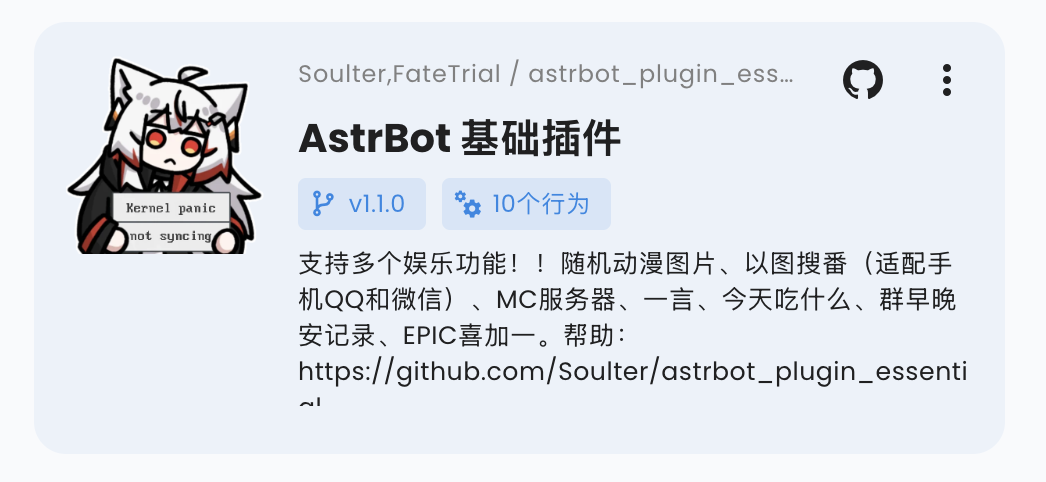
You can add a `logo.png` file in the plugin directory as the plugin's logo. Please maintain an aspect ratio of 1:1, with a recommended size of 256x256.
|
|
|
|
|
|
|
|
### Plugin Display Name (Optional)
|
|
|
|
You can modify (or add) the `display_name` field in the `metadata.yaml` file to serve as the plugin's display name in scenarios like the plugin marketplace, making it easier for users to read.
|
|
|
|
Plugin display names and descriptions can follow the WebUI language. See [Plugin Internationalization](./guides/plugin-i18n).
|
|
|
|
### Plugin Short Description (Optional)
|
|
|
|
You can add a `short_desc` field to `metadata.yaml` as the short description shown on plugin marketplace cards. Keep it to a concise one-sentence summary. If it is not provided, cards fall back to `desc`.
|
|
|
|
```yaml
|
|
short_desc: A one-line summary of your plugin.
|
|
```
|
|
|
|
### Declare Supported Platforms (Optional)
|
|
|
|
You can add a `support_platforms` field (`list[str]`) to `metadata.yaml` to declare which platform adapters your plugin supports. The WebUI plugin page will display this field.
|
|
|
|
```yaml
|
|
support_platforms:
|
|
- telegram
|
|
- discord
|
|
```
|
|
|
|
The values in `support_platforms` must be keys from `ADAPTER_NAME_2_TYPE`. Currently supported:
|
|
|
|
- `aiocqhttp`
|
|
- `qq_official`
|
|
- `telegram`
|
|
- `wecom`
|
|
- `lark`
|
|
- `dingtalk`
|
|
- `discord`
|
|
- `slack`
|
|
- `kook`
|
|
- `vocechat`
|
|
- `weixin_official_account`
|
|
- `satori`
|
|
- `misskey`
|
|
- `line`
|
|
|
|
### Declare AstrBot Version Range (Optional)
|
|
|
|
You can add an `astrbot_version` field in `metadata.yaml` to declare the required AstrBot version range for your plugin. The format follows dependency specifiers in `pyproject.toml` (PEP 440), and must not include a `v` prefix.
|
|
|
|
```yaml
|
|
astrbot_version: ">=4.16,<5"
|
|
```
|
|
|
|
Examples:
|
|
|
|
- `>=4.17.0`
|
|
- `>=4.16,<5`
|
|
- `~=4.17`
|
|
|
|
If you only want to declare a minimum version, use:
|
|
|
|
- `>=4.17.0`
|
|
|
|
If the current AstrBot version does not satisfy this range, the plugin will be blocked from loading with a compatibility error.
|
|
In the WebUI installation flow, you can choose to "Ignore Warning and Install" to bypass this check.
|
|
|
|
### Debugging Plugins
|
|
|
|
AstrBot uses a runtime plugin injection mechanism. Therefore, when debugging plugins, you need to start the AstrBot main application.
|
|
|
|
You can use AstrBot's hot reload feature to streamline the development process.
|
|
|
|
After modifying the plugin code, you can find your plugin in the AstrBot WebUI's plugin management section, click the `...` button in the upper right corner, and select `Reload Plugin`.
|
|
|
|
If the plugin fails to load due to code errors or other reasons, you can also click **"Try one-click reload fix"** in the error prompt on the admin panel to reload it.
|
|
|
|
### Plugin Dependency Management
|
|
|
|
Currently, AstrBot manages plugin dependencies using pip's built-in `requirements.txt` file. If your plugin requires third-party libraries, please be sure to create a `requirements.txt` file in the plugin directory and list the dependencies used, to prevent Module Not Found errors when users install your plugin.
|
|
|
|
> For the complete format of `requirements.txt`, please refer to the [pip official documentation](https://pip.pypa.io/en/stable/reference/requirements-file-format/).
|
|
|
|
## Development Principles
|
|
|
|
Thank you for contributing to the AstrBot ecosystem. Please follow these principles when developing plugins, which are also good programming practices:
|
|
|
|
- Features must be tested.
|
|
- Include comprehensive comments.
|
|
- Store persistent data in the `data` directory, not in the plugin's own directory, to prevent data loss when updating/reinstalling the plugin.
|
|
- Implement robust error handling mechanisms; don't let a single error crash the plugin.
|
|
- Before committing, please use the [ruff](https://docs.astral.sh/ruff/) tool to format your code.
|
|
- Do not use the `requests` library for network requests; use asynchronous network request libraries such as `aiohttp` or `httpx`.
|
|
- If you're extending functionality for an existing plugin, please prioritize submitting a PR to that plugin rather than creating a separate one (unless the original plugin author has stopped maintaining it).
|