mirror of
https://github.com/AstrBotDevs/AstrBot
synced 2026-07-16 01:40:15 +08:00
 b4a32fbda8
- Add 'config' to known zh/en doc structure differences
- Remove trailing whitespace from docs/zh/faq.md
- Remove trailing whitespace from docs/en/dev/plugin-platform-adapter.md
- Ensure all README files end with newline
186 lines
7.1 KiB
Markdown
186 lines
7.1 KiB
Markdown
---
|
||
outline: deep
|
||
---
|
||
|
||
# 开发一个平台适配器
|
||
|
||
AstrBot 支持以插件的形式接入平台适配器,你可以自行接入 AstrBot 没有的平台。如飞书、钉钉甚至是哔哩哔哩私信、Minecraft。
|
||
|
||
我们以一个平台 `FakePlatform` 为例展开讲解。
|
||
|
||
首先,在插件目录下新增 `fake_platform_adapter.py` 和 `fake_platform_event.py` 文件。前者主要是平台适配器的实现,后者是平台事件的定义。
|
||
|
||
## 平台适配器
|
||
|
||
假设 FakePlatform 的客户端 SDK 是这样:
|
||
|
||
```py
|
||
import asyncio
|
||
|
||
class FakeClient():
|
||
'''模拟一个消息平台,这里 5 秒钟下发一个消息'''
|
||
def __init__(self, token: str, username: str):
|
||
self.token = token
|
||
self.username = username
|
||
# ...
|
||
|
||
async def start_polling(self):
|
||
while True:
|
||
await asyncio.sleep(5)
|
||
await getattr(self, 'on_message_received')({
|
||
'bot_id': '123',
|
||
'content': '新消息',
|
||
'username': 'zhangsan',
|
||
'userid': '123',
|
||
'message_id': 'asdhoashd',
|
||
'group_id': 'group123',
|
||
})
|
||
|
||
async def send_text(self, to: str, message: str):
|
||
print('发了消息:', to, message)
|
||
|
||
async def send_image(self, to: str, image_path: str):
|
||
print('发了消息:', to, image_path)
|
||
```
|
||
|
||
我们创建 `fake_platform_adapter.py`:
|
||
|
||
```py
|
||
import asyncio
|
||
|
||
from astrbot.api.platform import Platform, AstrBotMessage, MessageMember, PlatformMetadata, MessageType
|
||
from astrbot.api.event import MessageChain
|
||
from astrbot.api.message_components import Plain, Image, Record # 消息链中的组件,可以根据需要导入
|
||
from astrbot.core.platform.astr_message_event import MessageSesion
|
||
from astrbot.api.platform import register_platform_adapter
|
||
from astrbot import logger
|
||
from .client import FakeClient
|
||
from .fake_platform_event import FakePlatformEvent
|
||
|
||
# 注册平台适配器。第一个参数为平台名,第二个为描述。第三个为默认配置。
|
||
@register_platform_adapter("fake", "fake 适配器", default_config_tmpl={
|
||
"token": "your_token",
|
||
"username": "bot_username"
|
||
})
|
||
class FakePlatformAdapter(Platform):
|
||
|
||
def __init__(self, platform_config: dict, platform_settings: dict, event_queue: asyncio.Queue) -> None:
|
||
super().__init__(event_queue)
|
||
self.config = platform_config # 上面的默认配置,用户填写后会传到这里
|
||
self.settings = platform_settings # platform_settings 平台设置。
|
||
|
||
async def send_by_session(self, session: MessageSesion, message_chain: MessageChain):
|
||
# 必须实现
|
||
await super().send_by_session(session, message_chain)
|
||
|
||
def meta(self) -> PlatformMetadata:
|
||
# 必须实现,直接像下面一样返回即可。
|
||
return PlatformMetadata(
|
||
"fake",
|
||
"fake 适配器",
|
||
)
|
||
|
||
async def run(self):
|
||
# 必须实现,这里是主要逻辑。
|
||
|
||
# FakeClient 是我们自己定义的,这里只是示例。这个是其回调函数
|
||
async def on_received(data):
|
||
logger.info(data)
|
||
abm = await self.convert_message(data=data) # 转换成 AstrBotMessage
|
||
await self.handle_msg(abm)
|
||
|
||
# 初始化 FakeClient
|
||
self.client = FakeClient(self.config['token'], self.config['username'])
|
||
self.client.on_message_received = on_received
|
||
await self.client.start_polling() # 持续监听消息,这是个堵塞方法。
|
||
|
||
async def convert_message(self, data: dict) -> AstrBotMessage:
|
||
# 将平台消息转换成 AstrBotMessage
|
||
# 这里就体现了适配程度,不同平台的消息结构不一样,这里需要根据实际情况进行转换。
|
||
abm = AstrBotMessage()
|
||
abm.type = MessageType.GROUP_MESSAGE # 还有 friend_message,对应私聊。具体平台具体分析。重要!
|
||
abm.group_id = data['group_id'] # 如果是私聊,这里可以不填
|
||
abm.message_str = data['content'] # 纯文本消息。重要!
|
||
abm.sender = MessageMember(user_id=data['userid'], nickname=data['username']) # 发送者。重要!
|
||
abm.message = [Plain(text=data['content'])] # 消息链。如果有其他类型的消息,直接 append 即可。重要!
|
||
abm.raw_message = data # 原始消息。
|
||
abm.self_id = data['bot_id']
|
||
abm.session_id = data['userid'] # 会话 ID。重要!
|
||
abm.message_id = data['message_id'] # 消息 ID。
|
||
|
||
return abm
|
||
|
||
async def handle_msg(self, message: AstrBotMessage):
|
||
# 处理消息
|
||
message_event = FakePlatformEvent(
|
||
message_str=message.message_str,
|
||
message_obj=message,
|
||
platform_meta=self.meta(),
|
||
session_id=message.session_id,
|
||
client=self.client
|
||
)
|
||
self.commit_event(message_event) # 提交事件到事件队列。不要忘记!
|
||
```
|
||
|
||
|
||
`fake_platform_event.py`:
|
||
|
||
```py
|
||
from astrbot.api.event import AstrMessageEvent, MessageChain
|
||
from astrbot.api.platform import AstrBotMessage, PlatformMetadata
|
||
from astrbot.api.message_components import Plain, Image
|
||
from .client import FakeClient
|
||
from astrbot.core.utils.io import download_image_by_url
|
||
|
||
class FakePlatformEvent(AstrMessageEvent):
|
||
def __init__(self, message_str: str, message_obj: AstrBotMessage, platform_meta: PlatformMetadata, session_id: str, client: FakeClient):
|
||
super().__init__(message_str, message_obj, platform_meta, session_id)
|
||
self.client = client
|
||
|
||
async def send(self, message: MessageChain):
|
||
for i in message.chain: # 遍历消息链
|
||
if isinstance(i, Plain): # 如果是文字类型的
|
||
await self.client.send_text(to=self.get_sender_id(), message=i.text)
|
||
elif isinstance(i, Image): # 如果是图片类型的
|
||
img_url = i.file
|
||
img_path = ""
|
||
# 下面的三个条件可以直接参考一下。
|
||
if img_url.startswith("file:///"):
|
||
img_path = img_url[8:]
|
||
elif i.file and i.file.startswith("http"):
|
||
img_path = await download_image_by_url(i.file)
|
||
else:
|
||
img_path = img_url
|
||
|
||
# 请善于 Debug!
|
||
|
||
await self.client.send_image(to=self.get_sender_id(), image_path=img_path)
|
||
|
||
await super().send(message) # 需要最后加上这一段,执行父类的 send 方法。
|
||
```
|
||
|
||
最后,main.py 只需这样,在初始化的时候导入 fake_platform_adapter 模块。装饰器会自动注册。
|
||
|
||
```py
|
||
from astrbot.api.star import Context, Star
|
||
|
||
class MyPlugin(Star):
|
||
def __init__(self, context: Context):
|
||
from .fake_platform_adapter import FakePlatformAdapter # noqa
|
||
```
|
||
|
||
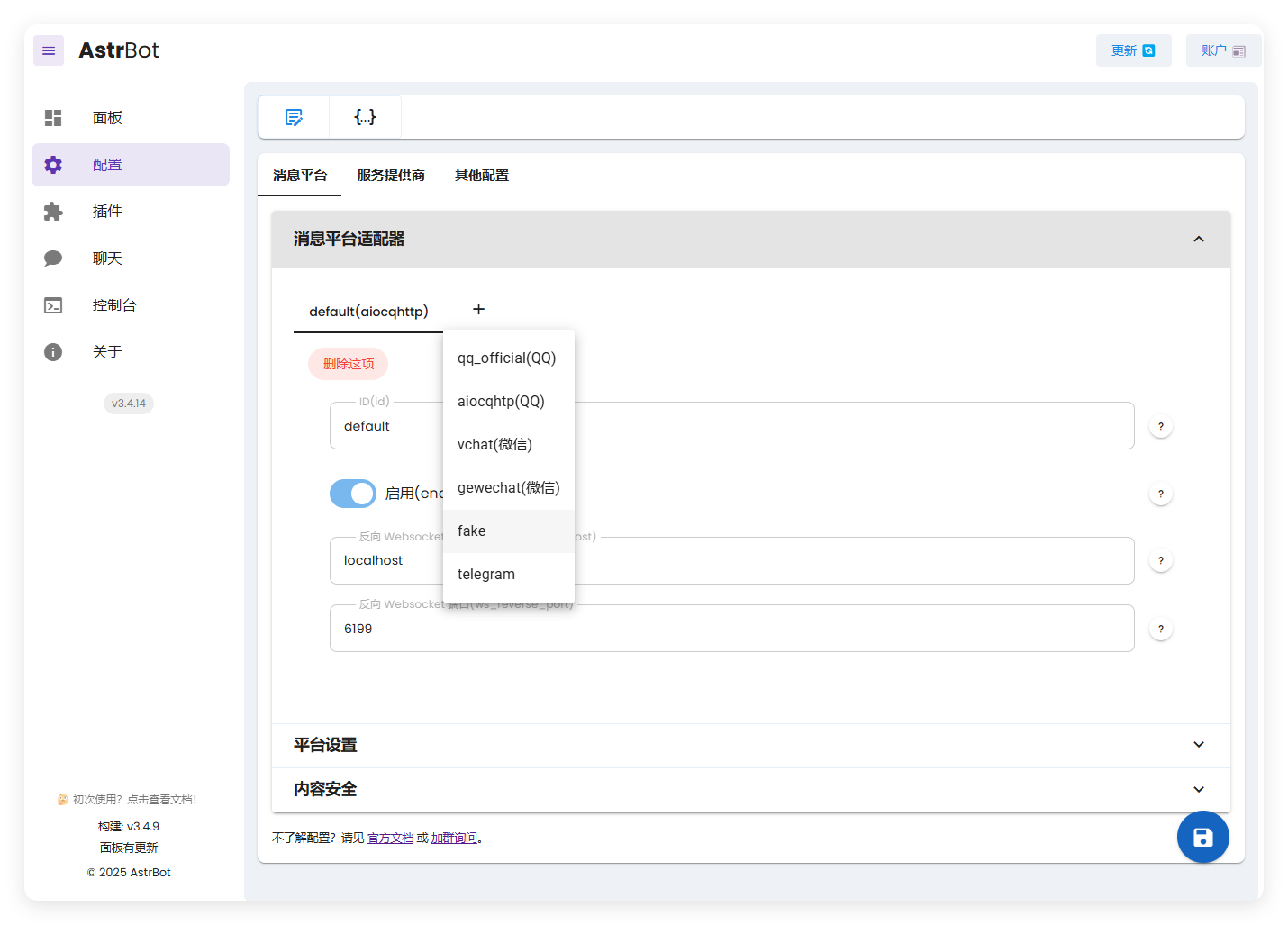
搞好后,运行 AstrBot:
|
||
|
||
|
||
|
||
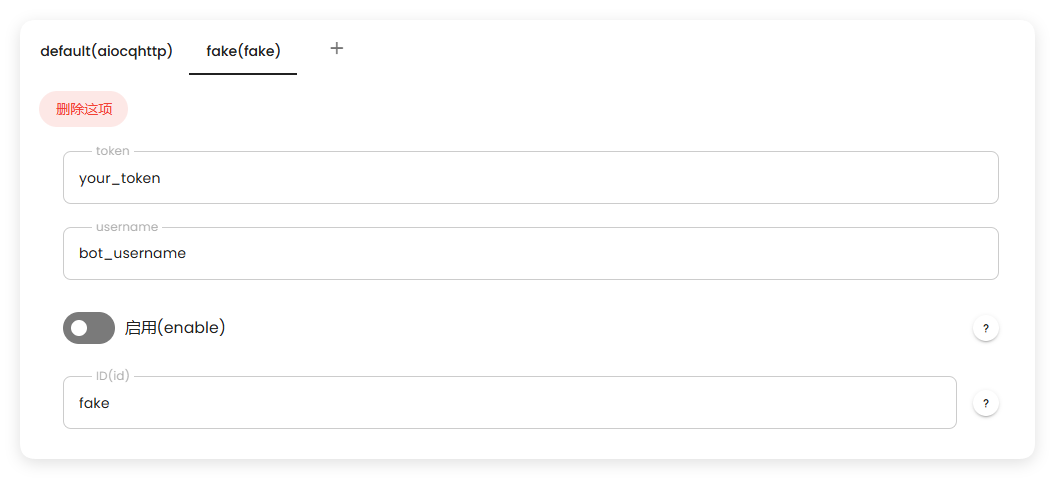
这里出现了我们创建的 fake。
|
||
|
||
|
||
|
||
启动后,可以看到正常工作:
|
||
|
||

|
||
|
||
|
||
有任何疑问欢迎加群询问~
|